
Solved

Force Copy

  • August 26, 2024
  • 27 replies
  • 531 views

Ellery Goudy
Forum|alt.badge.img+2

Is there a feature to be able to force copy a lucid document? With Jamboard going away I lose the capability to have a copy for each of my students. I know that if I do it in a canvas LTI, it will make a copy but on some assignments, I already have an LTI selected and need to be able to force a copy without going through the external tool feature. If this isn't already a capability, I would strongly suggest it be added. Losing this service would be pretty detrimental.
Best answer by Morgan T

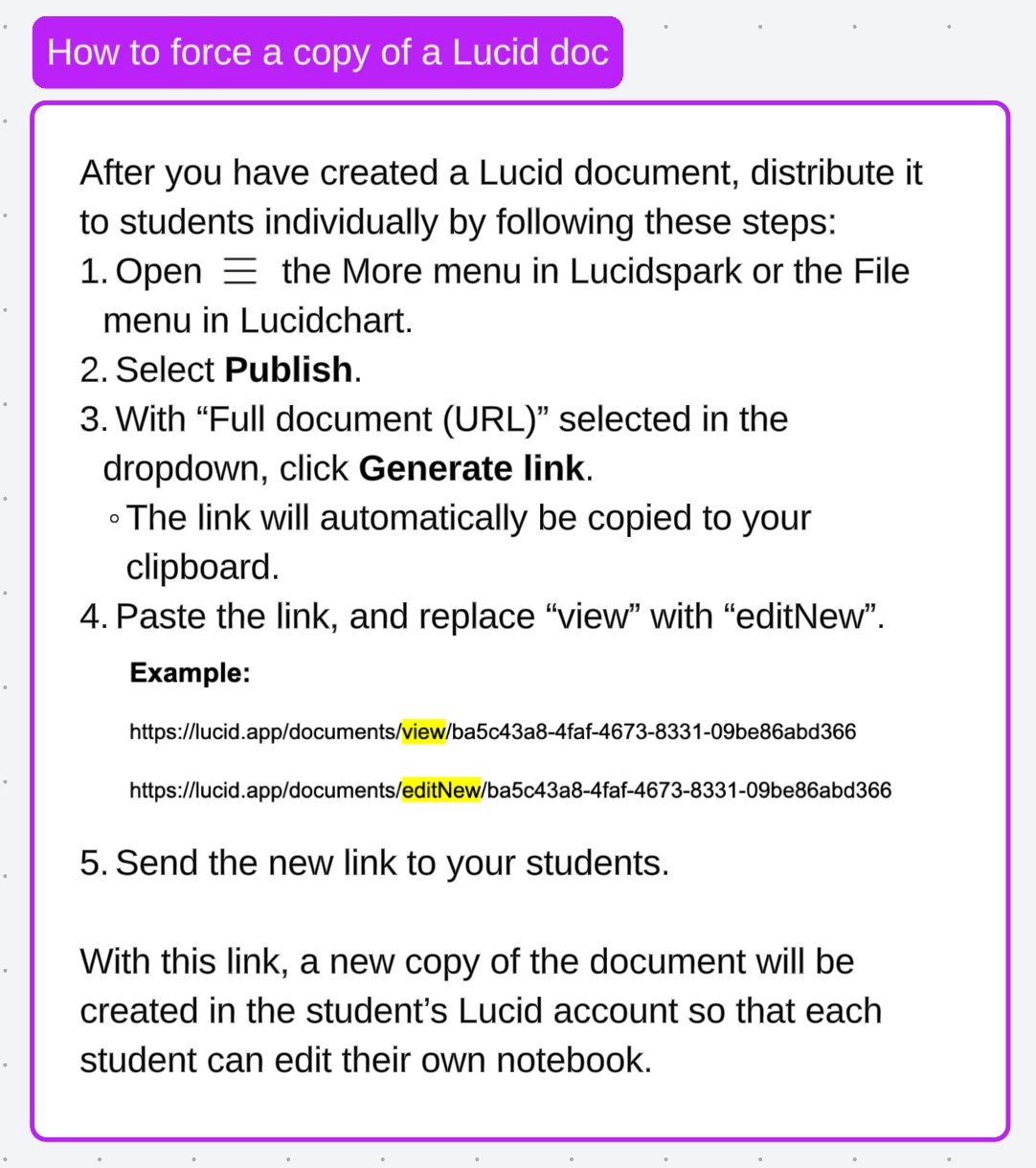
Hi @Ellery Goudy ! Just to reiterate what Kathy has said, check out these steps for creating a link that will force a copy for students! Thank you so much for the excellent troubleshooting steps @Kathy R !


Comments

Kathy R
Lucid Legend Level 5
Forum|alt.badge.img+11
  • Lucid Legend Level 5
  • August 26, 2024

I keep forgetting how to do this, but it is a thing!  I have used this video for reminding me how to make a forced copy of items for students.  I can then post the link for my students in Canvas without using the External Tool function.

Long story short: Copy the link for the document, then add NEW between the ‘edit’ and ‘?’ in the address line.  See the video below for a better explanation with more important details! :)


Ellery Goudy
Forum|alt.badge.img+2

This is what I get every time I do that process. I’ve been at it for hours now. Feeling defeated!


Kathy R
Lucid Legend Level 5
Forum|alt.badge.img+11
  • Lucid Legend Level 5
  • August 26, 2024

How frustrating!  Maybe it’s blocked at work since it’s on YouTube.  Here’s the written part of the transcript that should help:

  1. Find the Document you want to share
  2. Go to the top bar and press ‘File’ and ‘Publish’
  3. Click ‘Generate Link’
  4. Paste that link into a web browser (or Word doc… that some times easier for editing the link)
  5. In that link, there’s a phrase like ‘……..edit?…...’
  6. Between the EDIT and the ? character, type ‘New’
  7. Copy this new link and share that with your class.

Here’s an example of where to put the ‘New’ part:

Template:

https://lucid.app/lucidspark/da004bc5-e141-41f7-b083-5e534b5d044f/edit?invitationId=inv_27c10c3f-cf23-4d02-854c-a09c76a6327a


Here’s where you would add ‘New’ (half way thru, I changed the text to yellow between the ‘edit’ and ‘?’

https://lucid.app/lucidspark/da004bc5-e141-41f7-b083-5e534b5d044f/editNew?invitationId=inv_27c10c3f-cf23-4d02-854c-a09c76a6327a


Does that work?


Ellery Goudy
Forum|alt.badge.img+2

Thank you for your help! The video worked fine but that is the error I get on every Lucid document when I use those steps. Templates, nontemples, shared to view, shared to edit, published and nonpublished. I just can’t figure out why!


Kathy R
Lucid Legend Level 5
Forum|alt.badge.img+11
  • Lucid Legend Level 5
  • August 26, 2024

Ok - that’s actually even more frustrating!

I just did some playing around… I can get that screen when I’m just sharing a page.  

But, when I changed it into a template (doesn’t do anything to the document… just makes it a master template).  THEN, I published it and added the New.  That worked!  (I also played with the capital N vs the lower case n… doesn’t seem to matter) ;) 

Does it fix it for you??


Morgan T
Forum|alt.badge.img+16
  • Lucid support team
  • Answer
  • August 26, 2024

Hi @Ellery Goudy ! Just to reiterate what Kathy has said, check out these steps for creating a link that will force a copy for students! Thank you so much for the excellent troubleshooting steps @Kathy R !


Ellery Goudy
Forum|alt.badge.img+2

Does this only work with Lucidcharts? I have tried it on every single document, all Sparks, and each one of them get that error. Templates or not. I follow the steps to a T! I’ve tried the NEW and EDITNEW ways and none work.


Morgan T
Forum|alt.badge.img+16
  • Lucid support team
  • August 27, 2024

@Ellery Goudy Can you please send a temporary Support PIN for one of thr documents you are trying? This will allow me to take a closer look at the issue you’re experiencing. The Support PIN is only usable by Lucid Support agents, so it is okay to share publicly here. For more information on generating a Support PIN, check out this Help Center article.


Ellery Goudy
Forum|alt.badge.img+2

Here it is! bZ5g94QCqMSc


Rick P
Forum|alt.badge.img+1
  • Lucid product team
  • August 27, 2024

Does this only work with Lucidcharts? I have tried it on every single document, all Sparks, and each one of them get that error. Templates or not. I follow the steps to a T! I’ve tried the NEW and EDITNEW ways and none work.

It should work with Lucidchart and Lucidspark, and with templates.

One thought to check is whether you have the right permissions for the document. For example, is the document one that you created or have full edit permissions on? Or is it one that someone else created, and possibly didn’t share with full permissions to you?

Similarly, if the folder that holds the document is one that you don’t have permissions to create new documents in, that could cause a failure I suspect. Or if you are on a free account, and there’s a limit on how many documents you can create, it might give an error?

Just a few additional ideas for how it could cause a symptom like you’re describing :/ 


Morgan T
Forum|alt.badge.img+16
  • Lucid support team
  • August 27, 2024

@Ellery Goudy In addition to Rick’s suggestions, would you mind verifying for me that you first published the document according to the steps I shared above?


Rick P
Forum|alt.badge.img+1
  • Lucid product team
  • August 27, 2024

This is what I get every time I do that process. I’ve been at it for hours now. Feeling defeated!

My interpretation for what this means:

The request was submitted to create a new document! The system attempted to respond, and “something went wrong”. Then the browser session attempted to load the resulting new document. Which doesn’t exist. So the message becomes “Sorry, we couldn’t find the page you’re looking for”.

But that’s not entirely clear as to what failed, or why.


Ellery Goudy
Forum|alt.badge.img+2
  1. Full sharing permissions are on to edit.
  2. These are all documents that I have created
  3. None of the documents are in a folder. All just housed in recent documents.
  4. This account is part of the Core Bundle that is paid for by my district.
  5. Each document I have tried has been published. 

I am truly stumped! I promise I am not a tech newbie. I am our school’s digital coach and just can not figure it out!


Morgan T
Forum|alt.badge.img+16
  • Lucid support team
  • August 27, 2024

@Ellery Goudy I’m sorry if this is redundant, but I just want to double check. When you are editing the link to add “editNew”, are you using the link from the Publish panel as shown below:


Morgan T
Forum|alt.badge.img+16
  • Lucid support team
  • August 27, 2024

If that still doesn’t work, let’s try another method. Can you make a document into a template following the steps here, then follow the steps here to copy a share link?


Ellery Goudy
Forum|alt.badge.img+2

Correct, I am using the publish link. I have tried it with the shareable link as well for good measure and no luck. Here are the steps recommended and the result I get. Screen Recording


Kathy R
Lucid Legend Level 5
Forum|alt.badge.img+11
  • Lucid Legend Level 5
  • August 27, 2024

I can get it to do what you have done too!  It’s not the link that works.  It’s a longer one.  After playing around, I’ve just clicked on the paperclip on the snapshot of the document and used that link.  The ‘edit’ and ‘?’ are in the middle of these links, not the end.  


Ellery Goudy
Forum|alt.badge.img+2

I have tried both ways. Literally no combination of any of the steps will create a force copy. :) 


Morgan T
Forum|alt.badge.img+16
  • Lucid support team
  • August 27, 2024

@Ellery Goudy Would you mind trying the steps you showed in your first video, but capitalize the “N” in “editNew”?


Ellery Goudy
Forum|alt.badge.img+2

HOLD YOUR BREATH! I think I got it to work. Does this look right? https://www.loom.com/share/e4c9993df9414a7b96137bfddceb2a3b?sid=ffd4c26b-67df-4b18-a58a-1969dd4d5461


Kathy R
Lucid Legend Level 5
Forum|alt.badge.img+11
  • Lucid Legend Level 5
  • August 27, 2024

YAY!  It worked!!  It doesn’t say ‘opening a copy’ or anything like other programs do.  When I started this, I said I tried with both the capital N and the lowercase n… it didn’t seem to make a difference for me.  Who knows!  

Last thing to check would be to obviously share the link with a good kid before trying it in class with everyone, just to make sure!

Yay yay yay!!


Ellery Goudy
Forum|alt.badge.img+2

Oh you guys. You have no idea how much grief this will save me! THANK YOU THANK YOU THANK YOU everyone! So many helpful hands over here. You guys were so quick to jump on and stick with me. Lucid fan girl for life now!


Kathy R
Lucid Legend Level 5
Forum|alt.badge.img+11
  • Lucid Legend Level 5
  • August 27, 2024

I have found the same with my kids (K-5) - I struggle with something and then when I get it to work, it’s really cool.  Lucid is SO deep, but once you figure things out, it has some really great things for education.  :)


Morgan T
Forum|alt.badge.img+16
  • Lucid support team
  • August 27, 2024

I’m so happy it worked! Let us know if you have any additional questions!


Ellery Goudy
Forum|alt.badge.img+2

I do have one itty bitty question you could take a look at because I’m sure you’re not busy or anything 😉 https://www.loom.com/share/c35f3e92c2a34f07a6f9aec558ea777f?sid=6c3b9591-e898-470c-b2cf-0fe27ff72fac