
Hi Team
Below url not working
https://lucid.app/oauth2/clients/{client id}/redirect
Getting
We couldn't find the page you're looking for.

Hi Team
Below url not working
https://lucid.app/oauth2/clients/{client id}/redirect
Getting
We couldn't find the page you're looking for.
Best answer by Michael B
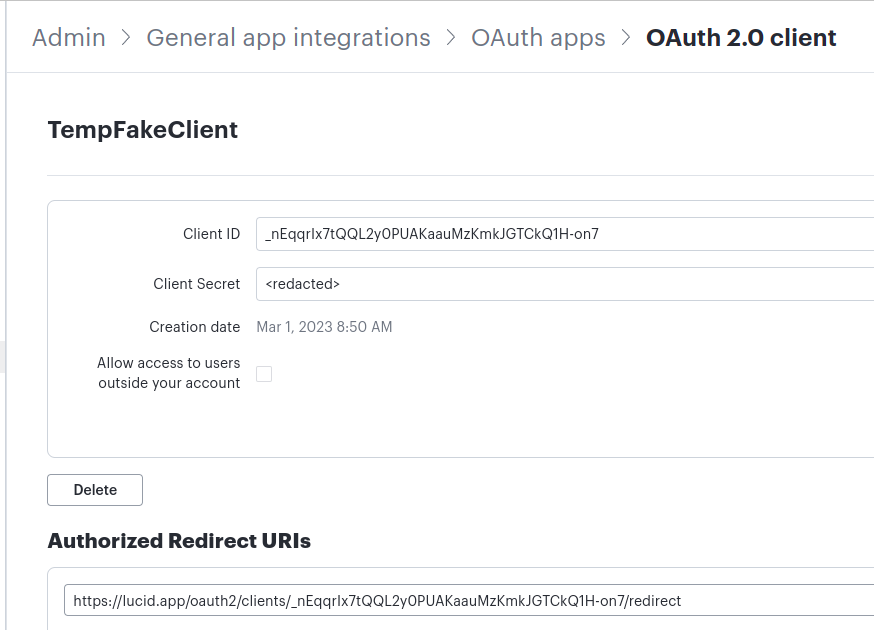
You will need to replace the {client id} in the redirect URL with the ClientId of your OAuth2 client. For example in the screenshot below I have a client with id "_nEqqrlx7tQQL2y)PUAKaaMzKmkJGTCkQ1h-on7". To enable redirecting on that client I have set my Authorized Redirect URI to: "https://lucid.app/oauth2/clients/_nEqqrlx7tQQL2y)PUAKaaMzKmkJGTCkQ1h-on7/redirect.
Information about configuring your OAuth2 client can be found here. Once your OAuth2 client is configured you will no longer get the "page not found" error when authenticating.
A Lucid or airfocus account is required to interact with the Community, and your participation is subject to the Supplemental Lucid Community Terms. You may not participate in the Community if you are under 18. You will be redirected to the Lucid or airfocus app to log in.
A Lucid or airfocus account is required to interact with the Community, and your participation is subject to the Supplemental Lucid Community Terms. You may not participate in the Community if you are under 18. You will be redirected to the Lucid or airfocus app to log in.
Enter your E-mail address. We'll send you an e-mail with instructions to reset your password.


 Your privacy choices


