Idea

Transparent Page Background in Google Slides

Related products:LucidchartLucidspark
  • January 16, 2018
  • 5 replies
  • 137 views

Tamim J

I have used the Google Slides Integration and cannot get the Diagrams I create to have a transparent background regardless of the color I set in the Settings>Page>Color setting. Can you please help me understand why? Thank you.

July 18, 2024

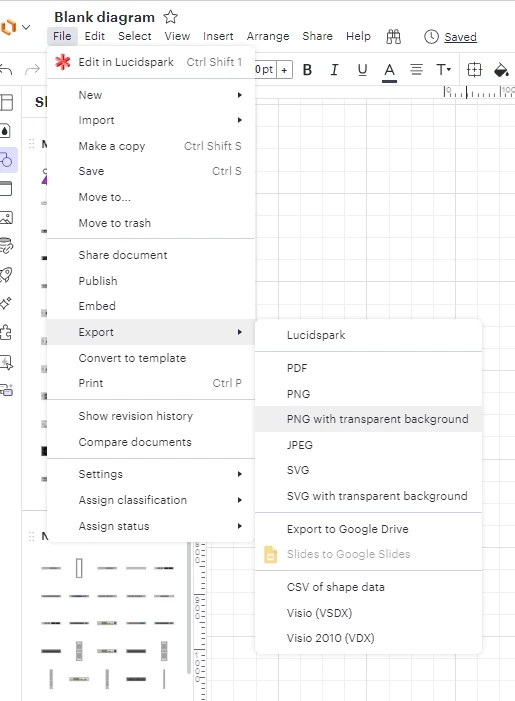
Hi @rosenblumss, thanks for continuing this thread. Unfortunately, a transparent background still isn’t supported in the Lucidchart integration for Google Slides. Thank you for taking the time to let us know this is important to you! If you’ve not yet already, please consider upvoting this request to help us capture its popularity. As a workaround, I would suggest exporting your diagram as a PNG or SVG with a transparent background, then inserting that file into your Slides. 


Comments

Remy M
  • Lucidite
  • January 16, 2018

Hi Tamim

Thanks for your post! Unfortunately, Our Google Slides integration will by default create your slides with a white background even when you have transparent color selected in Lucidchart, but we’re very interested in your feedback and committed to continually improving our products. If you’re willing to share, we’d love to hear more details about your use case or what you’d like to see in this experience within this thread. I’ve also converted this post to an idea so that it’s visible to others within the Product Feedback section of the community - from here, they can upvote it and add details of their own.


Forum|alt.badge.img+1
  • January 18, 2024

is this still the same?


Phillip W
Forum|alt.badge.img+16
  • Lucid support team
  • January 18, 2024

Hey @daniel -- thanks for posting! Yes, this functionality is still the same. If this is something you’d like to see changed in the future, would you care to post in our Product feedback channel? This will get your idea in front of our devs for their consideration!


Forum|alt.badge.img

Is this still a gap? This is making Lucid really hard for me to add to my workflow. It’s almost easier to just make the figure in PowerPoint and export from there into Google Slides


Micah
Forum|alt.badge.img+20
  • Lucid community team
  • July 18, 2024

Hi @rosenblumss, thanks for continuing this thread. Unfortunately, a transparent background still isn’t supported in the Lucidchart integration for Google Slides. Thank you for taking the time to let us know this is important to you! If you’ve not yet already, please consider upvoting this request to help us capture its popularity. As a workaround, I would suggest exporting your diagram as a PNG or SVG with a transparent background, then inserting that file into your Slides.