Delivered

Shareable link for specific frame

Related products:Lucidspark
  • October 4, 2021
  • 7 replies
  • 117 views

Keeley S
Forum|alt.badge.img+2

I also wish I could link to a frame in a board. I want to be able to share a link with people that takes them directly to the frame I am referencing. 

January 8, 2024

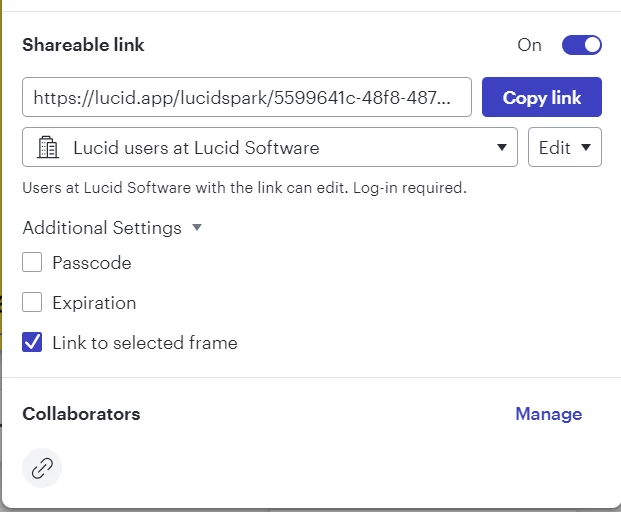
Good news - linking to a specific frame is now supported! To do so, you’ll create a sharable link to that specific frame. Select the Frame, click Share, expand the Additional Settings dropdown, and select the “Link to selected frame” option. 

Comments

Ashley C
Forum|alt.badge.img+11
  • Lucid support team
  • October 4, 2021

Hi Keeley

Would you mind passing along that idea to our Product Developers using this form? Thanks for taking the time to share ideas that help us make Lucidspark an even better tool!


Keeley S
Forum|alt.badge.img+2
  • Author
  • October 4, 2021

Yep - already submitted the idea


Steve B102
  • January 10, 2023

Is there a way to find and upvote the tickets from @aaron s and/or @keeley s?

I also want a feature like this.  I want links to other locations on the board to act the same as the Table of Contents - It just refocuses on the linked frame.  I don't want to make a mess of the feature requests list.


Micah
Forum|alt.badge.img+20
  • Lucid community team
  • January 8, 2024

Good news - linking to a specific frame is now supported! To do so, you’ll create a sharable link to that specific frame. Select the Frame, click Share, expand the Additional Settings dropdown, and select the “Link to selected frame” option. 


Micah
Forum|alt.badge.img+20
  • Lucid community team
  • January 8, 2024
IdeaDelivered

Forum|alt.badge.img
  • October 1, 2025

Hi. Need Help finding the FRAME option. 


Ambar D
Forum|alt.badge.img+10
  • Lucid community team
  • October 1, 2025

Hi ​@sergio.f

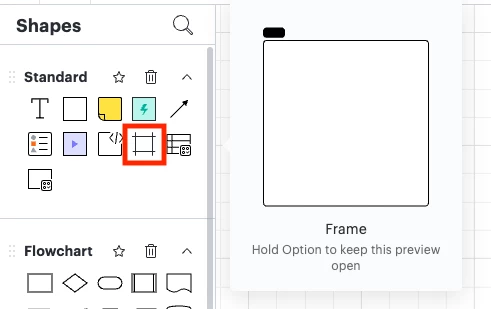
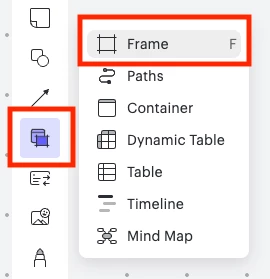
Thanks for adding to this thread! You can add a frame to your board from within a Lucidchart or Lucidspark board. 

In Lucidchart, you can find the frame shape from the shapes panel on the left-hand side of your board. 

In Lucidspark, this looks a bit different, but you can access the frame from the left-hand panel as well. 

Let me know if you have any additional questions!