Idea

Shape Options aspect ratio locked/unlocked icon doesn't update to reflect state

Related products:Lucidchart
  • November 22, 2024
  • 6 replies
  • 80 views

Forum|alt.badge.img+1

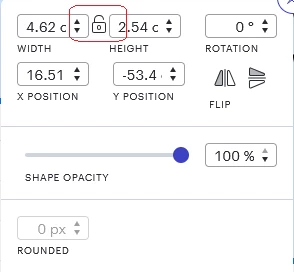
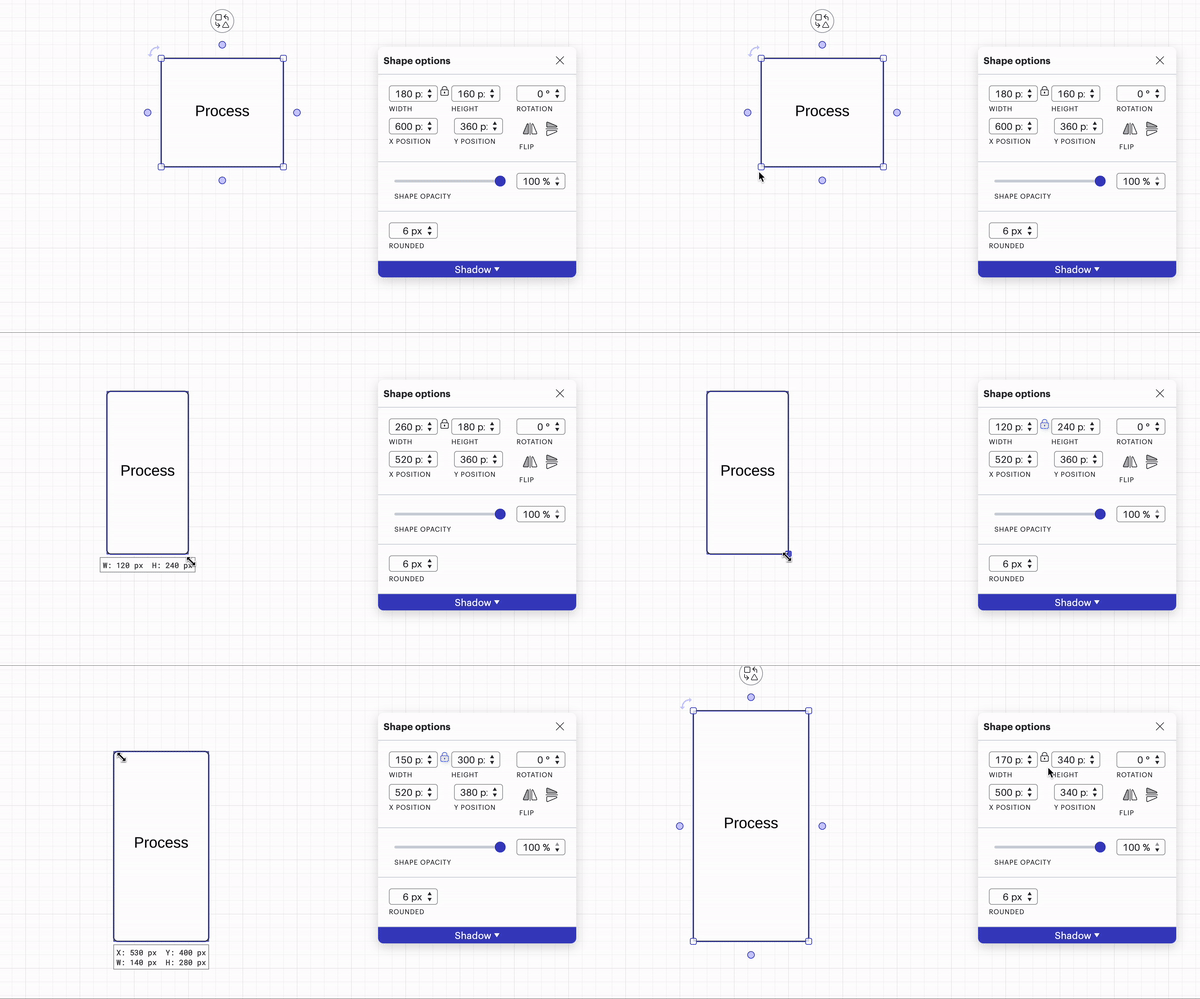
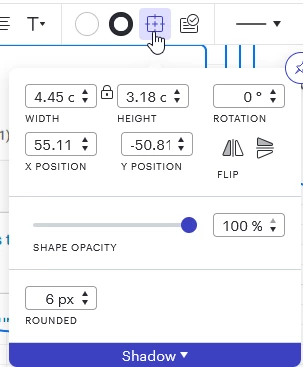
Click the Shape Options aspect ratio lock icon DOES work - that is it does correctly toggle the shapes aspect ratio on resize to locked or unlocked.  However the icon does not update to show the correct locked or unlocked aspect ratio status - it incorrectly ALWAYS shows the aspect ratio as locked.

The shape I am looking at the options for here has an UNlocked aspect ratio - but it still shows as locked:

 

Comments

Ambar D
Forum|alt.badge.img+10
  • Lucid community team
  • November 25, 2024

Hi ​@Ric, thanks for this idea! We encourage anyone else who’s interested in this to upvote this post and share any additional details about your use case or what you’d like to see in this experience. For more information about how we manage feedback in this community, please take a look at this post:


Forum|alt.badge.img+1
  • Author
  • November 26, 2024

Just to clarify: I can click the Shape Options aspect ratio lock icon - that's great.  But there is no feedback to that click, the icon doesn’t change in real-time in response to the click.  If I accidentally click twice or more I can get lost - is the aspect ratio now locked or unlocked? I don’t know because the icon is always a locked padlock.  If on each click the icon toggled from locked icon to unlocked icon it would be immediately obvious.

As it is: you click, you hope it did want you want (lock or unlock aspect ratio), you have to go to the shape and see if its aspect ratio behavior is now whats expected.  Going back to the Shape Options menu will always show it as locked regardless of its actual state, which further confuses things.

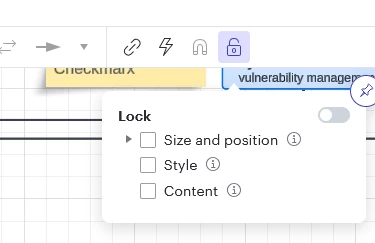
The lock/unlock shape feature already does this and updates the lock shape icon on the tool bar.  Apply the same logic to the Shape Options/lock aspect ratio e.g.:


Ambar D
Forum|alt.badge.img+10
  • Lucid community team
  • November 27, 2024

Hi ​@Ric, thank you for following up! I am double-checking with the product team to ensure that this is the intended functionality. I will update this thread with what I hear back.

In the meantime, there may be another way to check. You are correct in that the lock icon itself does not appear to change depending on whether you’ve locked the aspect ratio or not. However, the color of the lock icon does change. When the aspect ratio is unlocked, the icon is black. After locking the aspect ratio, the icon will change from black to blue.


Ambar D
Forum|alt.badge.img+10
  • Lucid community team
  • December 4, 2024

Hi ​@Ric, just following up to let you know I’ve heard back from the product team! This is the intended functionality of the lock icon within the Shape Options menu.

Thank you once again for posting this idea in the Product Feedback section of the community! Your feedback is incredibly important to us.

We encourage anyone else who’s interested in this to upvote this post and share any additional details about your use case or what you’d like to see in this experience.


Forum|alt.badge.img+1
  • Author
  • December 5, 2024

“This is the intended functionality“ - Do you mean the existing behavior is the intended functionality?

There are two things clearly wrong with the existing behavior:

  1. I spent 30 minutes looking at this in detail, including taking screen shots to make this post and I FAILED TO NOTICE THE CHANGE IN COLOR. So that basically broken UX right there.
  2. The lock shape icon on the tool bare DOES CHANGE BETWEEN LOCK AND UNLOCK ICON - so the behavior of the SAME icon in the two almost identical cases is very different - in one place you change the icon from locked to unlocked (good clear UX) in the other you change the color imperceptibly (UX fail). BE CONSISTENT WITH YOUR UX.

UX is what makes or breaks your app - you should be ALL OVER THIS.


Ambar D
Forum|alt.badge.img+10
  • Lucid community team
  • December 9, 2024

Hi ​@Ric, thank you for following up. The existing behavior is the intended functionality here, and I can understand your frustration. Thank you letting us know that this is important to you! We’re very interested in your feedback and committed to continually improving our products. This has been communicated to our product team.

For more information about how we manage feedback in this community, please take a look at this post: