Idea

selectable (to copy) "Notes" with "Comment" permission

  • January 18, 2021
  • 4 replies
  • 23 views

Bharath R

Hi everyone

I am using lucid chart to map out some network topologies. There are some information about each network device I would like to document (for example IP Console details services running etc) and I am adding these details using "Notes". 

When I share the document with my colleagues I want to give them View/Comment permissions but not edit permission. In View/Comment mode they can see the "Note" contents but cannot select it (so that they can copy it). Can the text in Notes be selectable with View/Comment permissions? It should not be editable but should be able to copy it (like HTML pages).

~Regards
Bharath

February 26, 2024

Idea merged into:

All the votes from this idea have been transferred.

Comments

Abby S
Forum|alt.badge.img+11
  • Lucid community team
  • January 19, 2021

Hi Bharath

Thanks for reaching out to the Lucid community. Unfortunately as you mentioned text in notes is not selectable in View/Comment mode. However we're always looking for ways to improve Lucidchart and your feedback is the best way for us to do that. I’ve gone ahead and converted this into an idea in our Product Feedback space, where others can upvote it and comment additional details about their use case. 

As a workaround you could add the note text into a shape (perhaps a sticky note shape to indicate that the text in it is behaving as a note) and the text in that shape would be possible to copy and paste even in View/Comment mode.

I apologize for the inconvenience and hope that this helps you continue your work.


Jacob S102
  • January 7, 2022

My organization also has the same need for a permission level where a user can select a shape and add Comments but cannot move or modify the shape itself. This allows for the creator of a document to send it out for feedback while allowing them to review the feedback before making changes (asynchronous collaboration with limited change authority).


Ashley C
Forum|alt.badge.img+11
  • Lucid support team
  • January 7, 2022

Hi Jacob

Thanks for posting your question to the thread. Where what you're describing isn't an explicit permission level setting I'd like to suggest the following as an option.

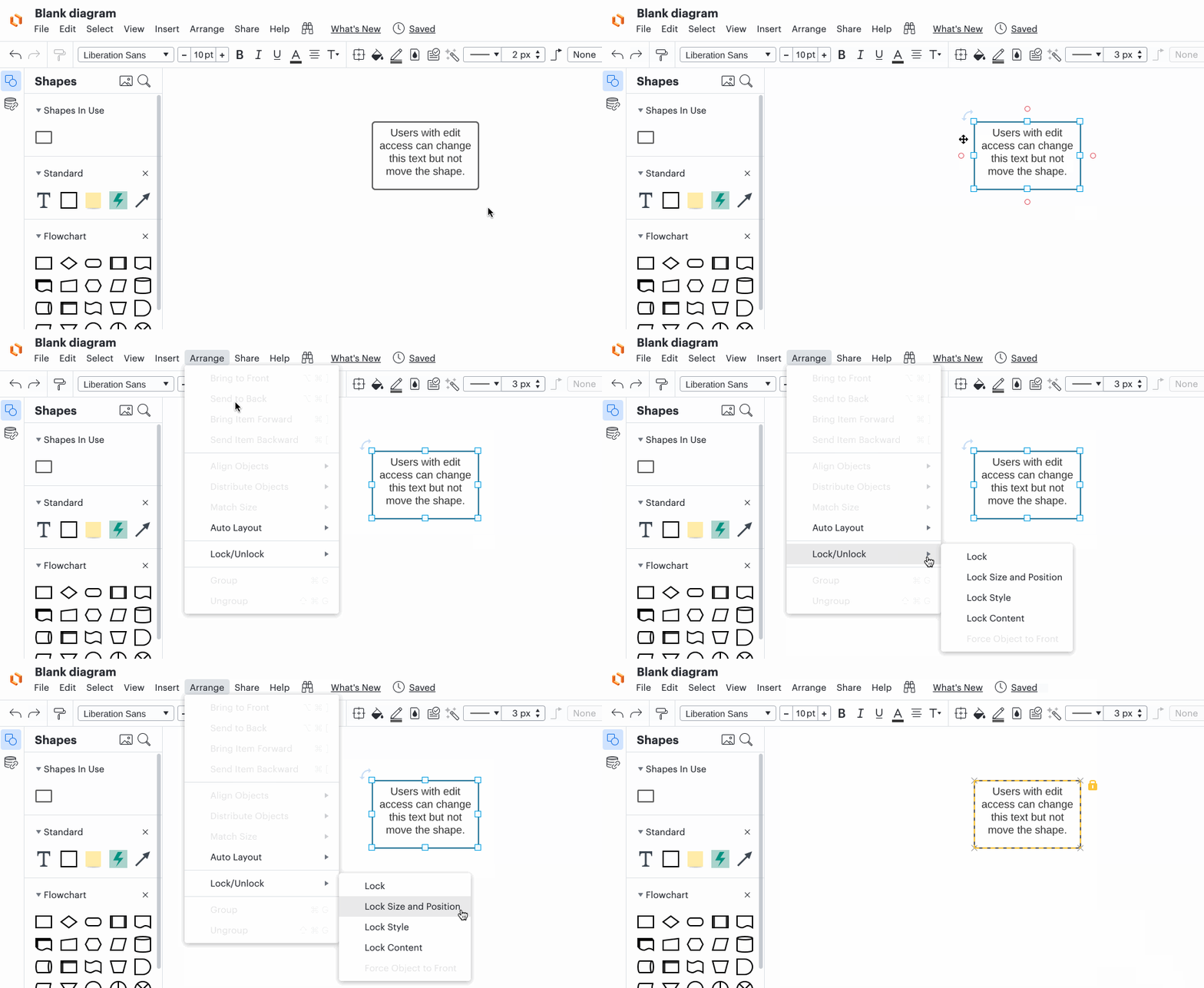
If you Lock an object you can set it so people you have shared your document with can edit the content within a shape but not move the shape itself. You would need to grant these individuals edit access to the overall document but can prevent what they can actually edit using the Lock feature. Here's what that looks like from your end.

23Nhci6t50x3KHscI0xu7g.gif

If this doesn't sound like it will work for your use case or if you'd like to pass along the idea to our product developers anyway, we’d love to hear more via this thread.

Let us know if you have any more questions!


Micah
Forum|alt.badge.img+20
  • Lucid community team
  • February 26, 2024
Idea merged into:

All the votes from this idea have been transferred.