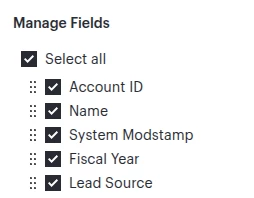
We integrate Lucidchart with Salesforce to create blueprints for our clients. The lucidcharts display information about entities we form for clients. The entity information is located within Smart Fields Layout menu. It would be wonderful to be able to have a “Select All” and “Deselect All” option for the Manage Fields submenu . Currently, all fields are selected and we need to manually select/deselect the fields that are pertinent to that specific entity for the client. Having that Select All / Deselect all option would help improve our quality of work and turnaround time.
Idea
Select/deselect smart fields
Create an account in the community
A Lucid or airfocus account is required to interact with the Community, and your participation is subject to the Supplemental Lucid Community Terms. You may not participate in the Community if you are under 18. You will be redirected to the Lucid or airfocus app to log in.
Log in to the community
A Lucid or airfocus account is required to interact with the Community, and your participation is subject to the Supplemental Lucid Community Terms. You may not participate in the Community if you are under 18. You will be redirected to the Lucid or airfocus app to log in.
Log in with Lucid Log in with airfocus
or
Enter your E-mail address. We'll send you an e-mail with instructions to reset your password.