Idea

Page navigation in Lucid

  • September 3, 2025
  • 26 replies
  • 436 views

Forum|alt.badge.img+1

The page navigation options at the bottom left of screen are not visible.


These options would allow me to bring up the pages either in a list view or a grill view (i.e. squares).


Where did it go?

Thanks,

RA

September 5, 2025

Hi all,

I want to thank you again for your comments and feedback on this change, and I apologize for the frustration here. Each of your comments has been shared directly with our product team, and they worked to improve the experience.

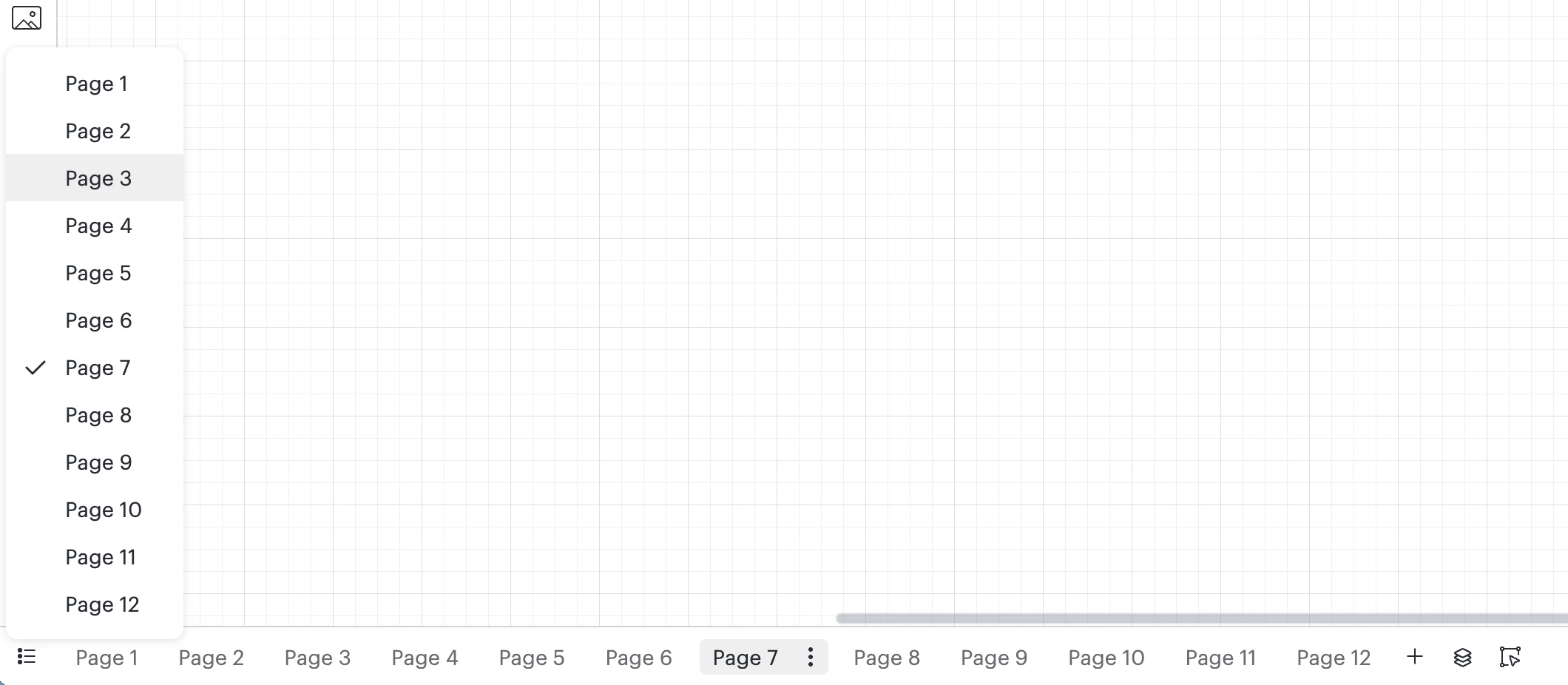
I have some good news on this topic. The list view of pages has been re-introduced in the footer.

This may still look a bit different than before, but in the bottom-left portion of the footer in Lucidchart, you can select the list view as shown below. I hope this helps with page navigation! 


As always, we still encourage and welcome your feedback on this feature!

If you’d like, please continue to let us know what you think in this thread. Each of your comments is extremely valuable to our product team as they continue to work on product enhancements. 

Comments

Shantel Gillette
Forum|alt.badge.img+5

Good morning ​@INCBUS,

Thank you for reaching out. We recently updated the footer in Lucidchart, and as a result, we removed the list and grid views for pages. This change was part of a larger effort to simplify the interface and make the most used features easier to find.

While those specific views are no longer available, you can now access page navigation from the left side of the footer.

We're still updating our help center to reflect these changes, but we hope this information helps.


Forum|alt.badge.img+1
  • Author
  • September 3, 2025

Hello. Thanks for the reply . In regards to your reply, “you can now access page navigation from the left side of the footer.”, I don’t see a page navigation option on the left side of the footer…
Maybe it’s an oversight on my part...


Forum|alt.badge.img
  • September 3, 2025

Just to add a +1 to this.

I regularly work with Lucid documents with 20-30 tabs, sometimes up to 50. The pop-up menu with the list of pages is such an important part of my team’s workflow. Losing it is going to be horrible.

From what I can see there’s no ability to quickly view a list of pages/tabs anymore. If that’s not the case, can someone from Lucid share a screenshot showing how to access it?

There doesn’t seem to be anything to bring up a list of pages to navigate between them in the bottom left from what I can see.


Forum|alt.badge.img+1
  • Author
  • September 3, 2025

I agree with jmcculloch,  losing the pages navigation feature(s) if not available would not be a good thing… It will make working with larger documents a bit unwieldly to say the least and affect the efficient maneuvering in the documents!

Maybe you could provide an option to allow users to select whether to allow the popup pages navigation.

Thanks.


Forum|alt.badge.img
  • September 3, 2025

Agree with everyone. This is a huge loss. I use that all day every day.


Lucio B
Forum|alt.badge.img+5
  • September 3, 2025

I agree with everyone as well. Page navigation is such an important part of the tool, especially when you have 30+ tabs.  It should not have been removed.  Please bring it back.


Ambar D
Forum|alt.badge.img+10
  • Lucid community team
  • September 3, 2025

Hi ​@INCBUS, ​@jmcculloch, ​@jennimck, and ​@Lucio B

Thank you for adding to this thread with your feedback. I apologize for any confusion or frustration here. To clarify, viewing a list of pages from the footer is no longer supported with this updated footer. At this time, scrolling left and right on the footer, or using the right and left arrows on the bottom bar, is the best method to navigate multiple pages. 

I certainly understand why this is important and how it may impact your workflows, and I’ve shared each of your comments here as direct feedback to our product team. 

I’ve also moved this post so that it is available to others within the Product Feedback space of this community, and available to our product teams for review. From here, other users can add to this thread with feedback on this feature. 


Forum|alt.badge.img
  • September 3, 2025

Again, we work with files with dozens of tabs. Scrolling is not feasible. Removing this feature will have a huge impact on our day-to-day work.


Forum|alt.badge.img+1
  • Author
  • September 3, 2025

Sorry, but I am having difficulty understanding why removing this function seemed like a good idea.
In  your original reply, ​@Shantel Gillette , you state this change was part of a larger effort to simplify the interface and make the most used features easier to find.

This appears to be one of those ‘most used features’, if not, quite useful for users with many tabs in a document.

Scrolling through the tabs at the bottom is totally inefficient IMHO.

Hope the page navigation function will be restored soon.

Thanks.

RA


Forum|alt.badge.img
  • September 4, 2025

agree with all above. this update is awful and makes navigation without my files completely unwieldy. terrible update.


Forum|alt.badge.img+1
  • September 4, 2025

Who had this silly idea to remove the list and grid views for pages? It is an important tool for my daily work when working with documents containing 20, 30, 40, 50 pages. In addition, the new page navigation is more confusing as the current page is not as much highlighted as it was before so I have to spend more time to check the navigation bar for the actual page. In total: not a good idea!


Forum|alt.badge.img+1
  • September 4, 2025

Came here with the same issue. The update did the opposite of what the intention was. We work with a lot of pages while interacting with customers. It is very common for us to switch between different pages in the document. This is now very annoying and therefore impacts the interaction with the customer.


Please just roll-back from the update for now until you find a better solution that works for every use case.


Forum|alt.badge.img
  • September 4, 2025

Hi ​@INCBUS, ​@jmcculloch, ​@jennimck, and ​@Lucio B

Thank you for adding to this thread with your feedback. I apologize for any confusion or frustration here. To clarify, viewing a list of pages from the footer is no longer supported with this updated footer. At this time, scrolling left and right on the footer, or using the right and left arrows on the bottom bar, is the best method to navigate multiple pages. 

I certainly understand why this is important and how it may impact your workflows, and I’ve shared each of your comments here as direct feedback to our product team. 

I’ve also moved this post so that it is available to others within the Product Feedback space of this community, and available to our product teams for review. From here, other users can add to this thread with feedback on this feature. 

Scrolling is no feasible option - takes time, prone to mistakes and absolutely inconvenient. We use Lucid for complex questions and therefore have complex documents. That we share with clients. This change in maneuverability is a great problem! Please give us the Overview-button back! Nothing got easier. It is real problem now.


Forum|alt.badge.img
  • September 4, 2025

Good morning ​@INCBUS,

Thank you for reaching out. We recently updated the footer in Lucidchart, and as a result, we removed the list and grid views for pages. This change was part of a larger effort to simplify the interface and make the most used features easier to find.

While those specific views are no longer available, you can now access page navigation from the left side of the footer.

We're still updating our help center to reflect these changes, but we hope this information helps.

Unfortunately there is no simplification achieved but the complete opposite, And the most used feature are our slides which are now very difficult to find in the document. Please connect with your everyday users. This update does not make sense at all!


Forum|alt.badge.img
  • September 4, 2025

I fully agree and really hope the page navigation comes back. It might not be the most clicks this little button gets, but surely it is a really relevant click.


Forum|alt.badge.img
  • September 4, 2025

Please bring the page navigation back, from a QA perspective it was very much helpful in scrolling through the tabs. Now manually we have to go through each tab and this is time consuming.


Waking up to this update yesterday immediately made me want to throw my laptop in the trash and give up on Lucidchart as my primary diagramming tool. It is incomprehensible to me why you would remove a feature like this. It is the ONLY method I use to navigate tabs. Scrolling horizontally trying to find the 1 tab out of 30 or 50 you want, when each tab has a long name and you don’t know what order they’re in -- is not only inefficient but maddening to be subjected to. Please for the love of everything, bring this back.


Chance K
Forum|alt.badge.img
  • September 4, 2025

This change will have a massive impact on our day to day workflow within the company I am with. I humbly request adding back in the page list view option somewhere if its not going to be in the footer.


Ambar D
Forum|alt.badge.img+10
  • Lucid community team
  • September 4, 2025

Hi all,

Thank you for taking the time to leave your feedback. I sincerely apologize for the frustration here.

I can certainly understand why this change may impact your workflows. Your feedback is incredibly valuable to us, and I have shared each one of your comments directly with our product team as product feedback. 


Zoe H102
Forum|alt.badge.img+4
  • September 4, 2025

Hi Lucid team. I understand the desire to unclutter things – however this decision is adversely affecting a lot of us. My documents regularly have up to 50 tabs. The tiny cut-off names visible in the tabs is impossible to be efficient with, as I now have to hover slowly over each tab to see each full name… and then repeatedly scroll/hover before finally finding my diagram. I’ve done a few meeting-presentations with Lucidchart in the last couple days and it’s been embarrassing how much time it takes for me to get to the right tab to show folks… not to mention how much it’s slowing down my internal work processes.

PLEASE BRING BACK THE POPUP NAV!

@Ambar D 


Ambar D
Forum|alt.badge.img+10
  • Lucid community team
  • September 5, 2025

Hi all,

I want to thank you again for your comments and feedback on this change, and I apologize for the frustration here. Each of your comments has been shared directly with our product team, and they worked to improve the experience.

I have some good news on this topic. The list view of pages has been re-introduced in the footer.

This may still look a bit different than before, but in the bottom-left portion of the footer in Lucidchart, you can select the list view as shown below. I hope this helps with page navigation! 


As always, we still encourage and welcome your feedback on this feature!

If you’d like, please continue to let us know what you think in this thread. Each of your comments is extremely valuable to our product team as they continue to work on product enhancements. 


Zoe H102
Forum|alt.badge.img+4
  • September 5, 2025

@Ambar D 

THANK YOU LUCID TEAM!!!!

Thanks for listening to your customers, and for continuing to support the rockstar product that Lucidchart is! 😻


Forum|alt.badge.img+1
  • September 8, 2025

Hi Ambar,

Thank you so much for taking our comments serious, I really appreciate!
However, I’d also love to have access to the grid view again, this would be marvelous!


Forum|alt.badge.img+1
  • Author
  • September 8, 2025

Thank you for listening and restoring this feature!
Great news!
(​@Ambar D if you are open to feedback on this feature, as per your post, a great enhancement might be the ability to add collapsible chapters /dividers for the pages to further document organization and navigation from within the documents. 
Just a friendly suggestion for your consideration.)

Thanks,

RA


Ambar D
Forum|alt.badge.img+10
  • Lucid community team
  • September 8, 2025

Thank you ​@Zoe H102, ​@Florian E, and ​@INCBUS for your added comments here. Your additional feedback here is always welcome, so thank you for letting us know what else you’d like to see! I certainly see how those items would be helpful. 

Our product team will continue to review your comments, and all items in the Product Feedback space of the community, as they research product enhancements and new features.

Please feel free to keep adding to this thread with your feedback or ideas, or if you have feedback on a different feature, don’t hesitate to create a new idea!

For more information on how Lucid manages feedback via this community, take a look at this post: