Idea

How do you track which collaborator have made changes?

  • January 5, 2022
  • 5 replies
  • 181 views

Ethan.G.Miller

Is there a way to track who has created or changed a specific shape or sticky note beyond color coding?

Comments

Micah
Forum|alt.badge.img+20
  • Lucid community team
  • January 5, 2022

Hi Ethan 

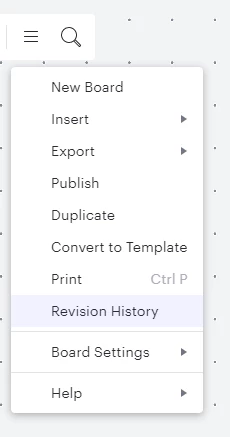
Thanks for posting in the Lucidspark community! Yes Lucidspark keeps a log of all changes made to a board using the Revision History tool! It's accessible within the menu near the title of your board.

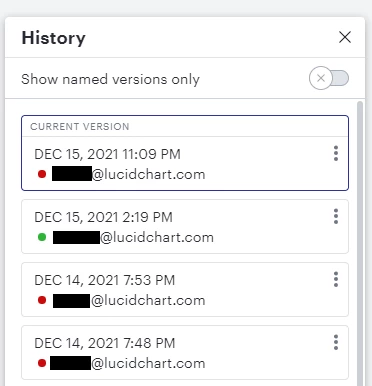
The board’s edit history will display as a list of stacked tiles with each tile representing a past version of the board. Each tile will display the date and time the changes were made as well as the full name or email address of the user who made the changes. Take a look at the example below!

When you click on one of these tiles you'll be able to view a version of that document at that timestamp with additions deletions and edits. I hope this helps! For a full description of its features feel free to take a look at this Revision History article from the Lucidspark Help Center and let me know if there's anything else I can help with! 


Ethan.G.Miller

I've tried this but the going through the history is very tedious since the history  doesn't mark what changes were made. There is no feature to quickly track the collaborator who made a specific object (beyond comment section color coding tagging etc..)? A collaborator/ creator auto tagging feature for new objects in a workspace would be incredibly helpful. 


Micah
Forum|alt.badge.img+20
  • Lucid community team
  • January 6, 2022

Hi Ethan thanks for continuing this thread. In this instance enforcing the use of Collaborator Colors would be your best option. While it is still a color-coding system Lucidspark's automation of it and inclusion of a legend may still prove useful to you. However I definitely understand the impact a creator auto-tagging feature for new objects could have. Would you be willing to share more details about your use case in this feature request form? Our development team highly values this kind of feedback when considering improvements to the product. Thanks for your request! Please let me know what else I can help with. 


Forum|alt.badge.img

Mural allows you to right click on an object to see who added it and when they added it. this is supper helpful to understand how the team contributed to the work. is there a way to see which object the team member added or modified?


Ambar D
Forum|alt.badge.img+12
  • Lucid community team
  • June 23, 2026

Hi ​@jenny.urban, thank you for your comment here! You have a few options to see what others have edited or added. 

  • Use revision history, which allows you to view the change history of a document. It displays the date and time the changes were made, as well as the full name of the user who made the changes.
  • Enable document change notifications. You can enable email notifications when a change is made to specific documents. Leverage this to get involved when account members are updating documentation or collaborating asynchronously.
  • If you’re using sticky notes, I’d recommend turning on collaborator colors, adding a color legend with names, and/or showing authors on the sticky notes. You can learn more about that here!

I hope this helps! Let me know if you have any questions about any of those features.