

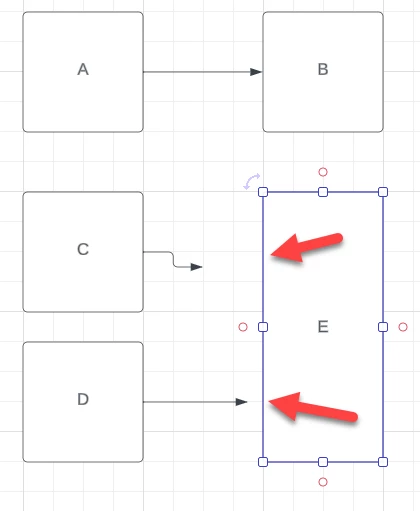
I am trying to take a simple rectangle - a “Block” shape - and connect lines to it somewhere else beside the midpoints of its sides. As an example - in blocks A and B the line is connected between them because the line is going from a midpoint (where there is a connection handle) to another midpoint.
But, on Block E I am unable to automatically connect the line from C or D to anywhere but the midpoint of E. Using Visio, I could ctrl-click on E to add connection points at the “1/4” and “3/4” positions of the left side face of E.
I have seen several related posts here like
and
along with several workarounds like
Some of these stretch back almost a decade? I know community forums can often have historical information that is no longer accurate because the product has changed or improved over time. Is there still no way in 2024 to add points to a shape where lines can be automatically connected?



 Your privacy choices


