Idea

How can I create a master process that serves as a starting point for other process flows?

Related products:LucidchartLucidspark
  • February 25, 2025
  • 5 replies
  • 45 views

Forum|alt.badge.img+1

I am maintaining several process maps that all share the same root process but each have their own variations. I would like to be able to maintain the root process in one map and have that reflect in all the other processes. For example, the root process looks like this… 

S1 > S2 > S3

One variation might be S1 > s1a > S2 > S3 > S3a.

Currently I copy the root process and make the modifications for each variation but when I need to maintain the root process, I have to update all the variation maps individually to keep them aligned to the root process. Is there a way to inherit a root process that can update when the root map is updated?


Comments

Cass A102
Forum|alt.badge.img+6
  • February 25, 2025

Hey ​@ann.edwards, would it work for you to create your master process in sheet 1, noting expanded processes with a specific icon (like the dual lines process box) and then link to it’s sub-process on another tab/page?  


Forum|alt.badge.img+1
  • Author
  • February 26, 2025

Hi ​@Cass A102, thank you for responding!

I tried the sub process idea but it gets confusing going back and forth so much. The root process is over 100 process steps.

I also tried using layers but that was not quite what I had in mind. I was looking for inheritance so you can still see the whole process for a variation but some objects inherit from a parent or master. I am thinking that might not be possible with LucidChart.


Leianne C
Forum|alt.badge.img+15
  • Lucid support team
  • February 28, 2025

Hi ​@ann.edwards, thank you for posting in the community! It sounds like the master page function in Lucid might be helpful for your use-case. 

Please let me know if that is not the case and I’d be happy to assist further! :) 


Forum|alt.badge.img+1
  • Author
  • February 28, 2025

Hi ​@Leianne C,. thank you for your response. Neither the Master Page or Template function work quite right. I like the Master Page’s ability to update one page and have that show up in all pages in that document, but it does not allow me to edit that process. For a template, I can edit the process each time I apply the template but have no way to edit in one place (at the level of the template) and have that reflect out to all places where it was used. 

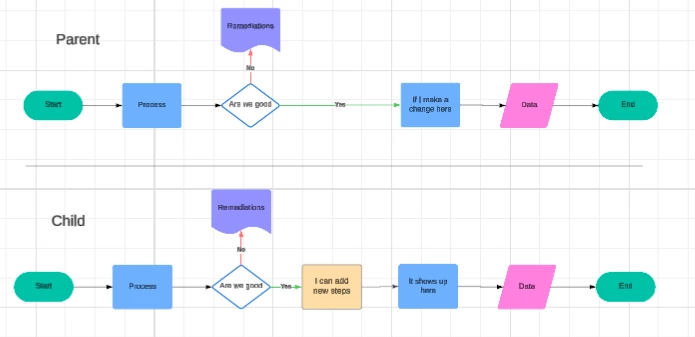
I need a combination of the 2. I want to create a master/parent process that can be edited by inserting new process steps in the children diagrams but retain the information of the parent objects. That ability would make Lucid a much more Enterprise-ready solution.

Similar to below but the diagrams would each be in different documents. 


Leianne C
Forum|alt.badge.img+15
  • Lucid support team
  • March 3, 2025

Hi ​@ann.edwards, thank you for giving that a try and sharing more details! I can certainly see how that option can be helpful for updating process

Unfortunately, this isn’t currently supported in Lucid, but we’re very interested in your feedback and committed to continually improving our products. If you’re willing to share, we’d love to hear more details about your use case or what you’d like to see in this experience within this thread. I’ve also converted this post to an idea so that it’s visible to others within the Product Feedback section of the community - from here, they can upvote it and add details of their own.

Finally, for more information on how Lucid manages feedback via this community, take a look at this post:

Thank you for sharing your feedback and ideas in the community. Please let us know if you have any questions!