Delivered

Find and Replace on a single page in Lucidchart

Related products:Lucidchart
  • December 14, 2018
  • 21 replies
  • 227 views

Stefano Pirrello

Hi


I have multiple pages for a drawing and I only want to find/replace on a single page but Lucidcharts keeps replacing the text for all pages.  Is there a way to focus on a single page only?

March 21, 2024

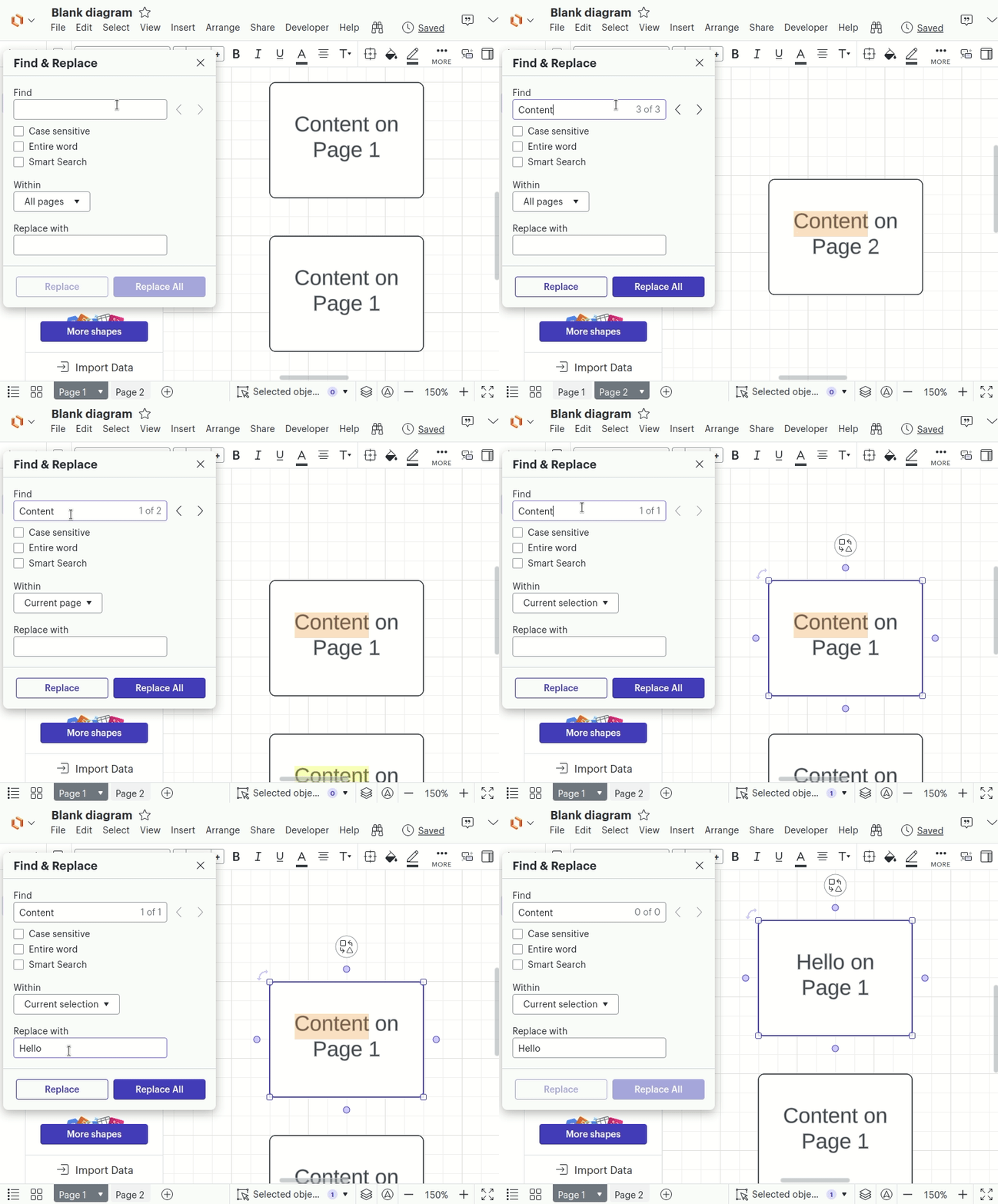
Hey everyone. I’m one of Lucid’s engineers, and I built this feature. Across the Lucid Suite, when you have multiple pages or an active selection, you should see a new subsection, “Within,” of the “Find & Replace” menu:


I wanted to thank you all for an excellent feature request. It was only recently that Lucid’s Community launched, and it has made customer feedback far more visible for Lucid’s Product teams. Keep the great ideas coming, and we’ll listen!

Comments

Andrew D
  • Lucidite
  • December 14, 2018

Hi Stefano

Thanks for reaching out. There is not a way to find and replace all of the text on a single page all at the same time. To achieve this purpose you can do the following: 

1. On the tabs below drag the page that you want to find and replace to the furthest left position

2. Select Ctrl + F or Command + F to open the find and replace window

3. Type in the word that you want to find and type in the word that you want to replace it with

4. Click "Replace" the number of times the "Find" word is found on that given page

I hope this helps!


Abby S
Forum|alt.badge.img+11
  • Lucid community team
  • April 28, 2020

Hi Tim

Thanks for posting in the community. This is a good idea - I’ve converted it into a request in our Product Feedback space so that others can see and upvote it, as well as add their own use case details. Please add any additional thoughts you have to this thread - thanks!


Pat.Kelly
  • September 9, 2020

This is a real challenge of a missing feature!  At the very least there should be a checkbox option to limit the replace and/or search to the current page.


Emma D
Forum|alt.badge.img+7
  • Lucid support team
  • September 10, 2020

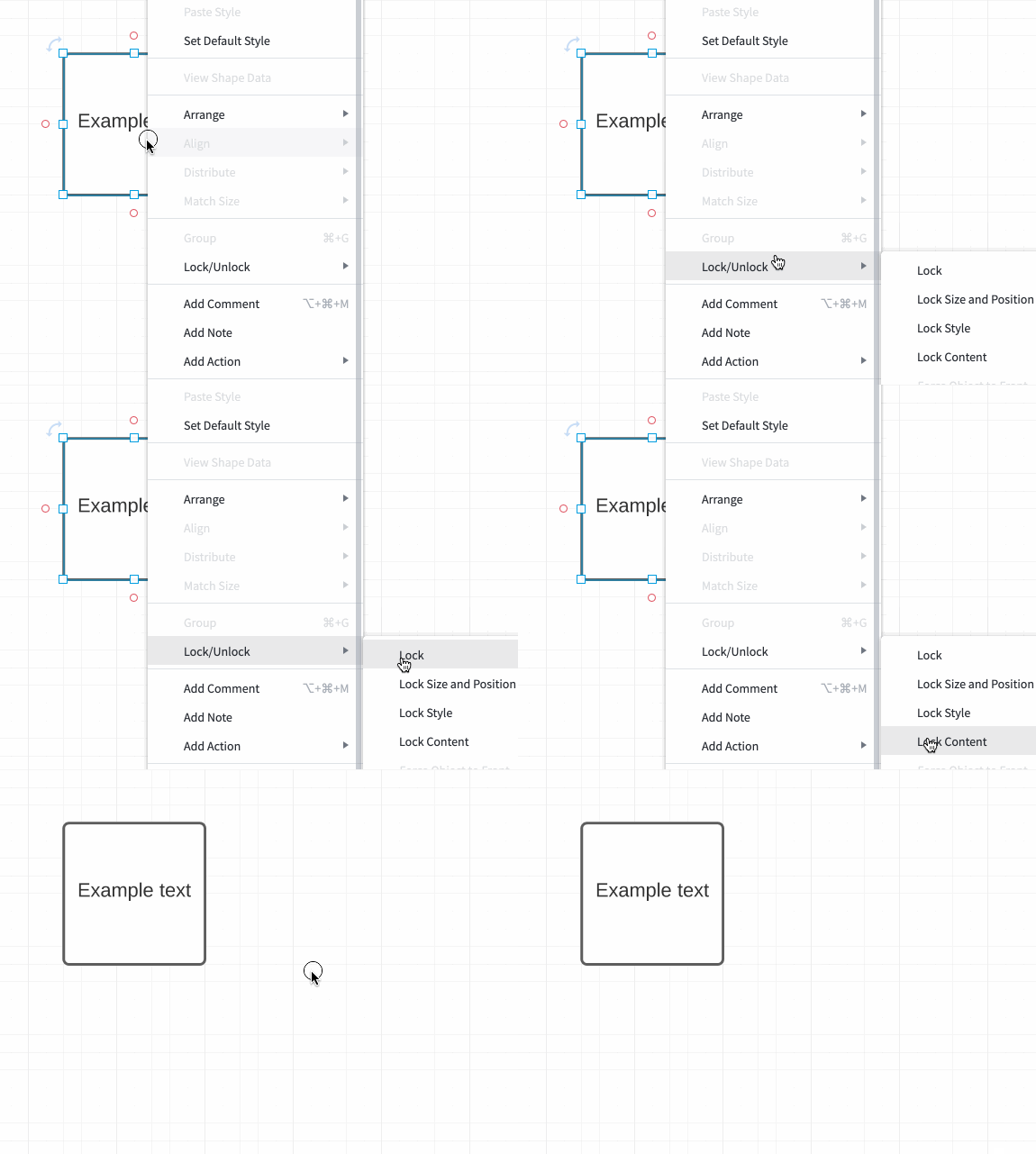
Hi Pat thanks for following up on this thread. Unfortunately this is still not possible but as a workaround I would recommend locking the content of the text box/shape containing the text on the page you don't want to change. To do this right click on the object containing the text and select Lock>Lock Content. Hope this helps!


Alex C102
  • January 24, 2023

Has this feature still not been added? Holy smokes!


Micah
Forum|alt.badge.img+20
  • Lucid community team
  • January 24, 2023

Hi Alex thanks for continuing this thread. We recognize that this would be a significant improvement to the experience with the Find and Replace tool and we're grateful for your feedback here. If you'd like to share additional use case details or how you'd like to see this experience be improved we would love to hear more via this thread. Apologies for any inconvenience!


Alex C102
  • January 27, 2023

Hi

So in my example...

On my first page or tab I've got an org chart with 150 or so people.  Then I've got about 10 subsequent pages or tabs which drill down into each specific department that makes up the 150 people org chart.  Sometimes I want to only search and find/replace a word on one of the pages/tabs not all 10 of them.


Micah
Forum|alt.badge.img+20
  • Lucid community team
  • January 27, 2023

Hi Alex thanks for responding with more information on the way you're utilizing the Find and Replace tool. I certainly understand how the ability to restrict the functionality to a single page would be useful here - thanks again for taking time to provide additional detail. 


Gil M
Forum|alt.badge.img+4
  • February 7, 2023

While you are working on this feature could you add the ability to only find & replace within the selected shapes?


Phillip W
Forum|alt.badge.img+16
  • Lucid support team
  • February 7, 2023

Hey Gil

Thank you keeping this thread going and I love the idea--this will be helpful to our development team as they prioritize improvements to our products. 

Thanks again for your idea and giving us the opportunity to improve Lucidchart to fit your work. Firm handshakes 🤝


Brad F
  • July 5, 2023

Hey everyone

I thought I would share my use case here in the hopes it possibly speeds up the addition of this feature. As it would be a huge time saver for my work.

With my work I draw floorplans of different buildings/work sites and map out where locations of lights are placed in such buildings. Each different type of light fitting has a corresponding letter associated to it in the legend for each job. So the legend goes per example: Light 1 = A Light 2 = B.. and so on. Sometimes the worksite has 1000's of lights multiple floors or both together. Drawing each floor of a building on one page isn't feasible as this work is sent to the government and they wouldn't be able to make out the minute details such as light orientation light type light level. distances and so on.

So each floor of a building is done on a separate page so it is easy to make out all the information the government has to verify. Since all of our information has to be accurate the number of total lights of each type has to be exact. There is also a legend on each separate page (i.e. floor of the building). When there is 100+ lights on a worksite it becomes a difficult and time-consuming job to hand count each one for the legend. This is where the find and replace tool comes in. I use CTRL + F to count how many of each type of light is on that worksite. But since I have to have a legend on each page that corresponds to what is on it's own respective page I get the total light count of each type over ALL pages/floors. 

With the example I'm working on at the moment which prompted me to add this comment.. I have a multi-level building. On each floor there is 100-200 lights (varies greatly between floors). On each page/floor of the building I need a legend which corresponds to ONLY that level. But when I CTRL+F to find the lights on a certain level it gives me the number for the whole worksite. I also have to keep the corresponding legend letter the same a I need a total light count done on a separate page once I've mapped all the individual lights out.

My current work-around is copying and pasting an ENTIRE page onto a black document and then CTRL+F that individual document just for one page to have an accurate legend. Then deleting that document as I don't want separate documents for floors (10+ documents for one worksite is inefficient).This doesn't sound too bad but copying and pasting over 1000+ objects per page isn't ideal. It takes a while to select the objects with CTRL+A to begin with then lags the whole computer for minutes when CTL+V onto a separate document.

I really hope this feature gets added soon as it would be a great help to my and my coworkers current workflow.


Leianne C
Forum|alt.badge.img+15
  • Lucid support team
  • July 6, 2023

Hi @brad f thank you for continuing this thread and sharing a detailed description of your use-case. I certainly understand how the option to find and replace in a single page will be helpful for your workflow - this is so helpful to our product teams in understanding which features our users are most interested in so it's the most effective way to add your voice to a feature request. 

 
Thanks again for sharing your feedback and request - we really appreciate it! 

Frank S102
Forum|alt.badge.img+2
  • November 1, 2023

I can't believe these requests go back to 2020 and this feature still hasn't been added! It seems like it would be an extremely easy (and useful!) feature to add. We need to be able to find/replace within the active page only! I've submitted another feature request but I'm highly doubtful it will ever get implemented. It makes me think these feature requests aren't taken seriously.


Leianne C
Forum|alt.badge.img+15
  • Lucid support team
  • November 2, 2023

Hi Frank thank you for continuing this thread and taking the time to submit a feature request. If you're interested to know what happens to your feedback or feature request, I would recommend giving the following Community post a quick read:


Thank you!


Micah
Forum|alt.badge.img+20
  • Lucid community team
  • March 4, 2024
The following idea has been merged into this idea:

All the votes have been transferred into this idea.

Micah
Forum|alt.badge.img+20
  • Lucid community team
  • March 4, 2024
The following idea has been merged into this idea:

All the votes have been transferred into this idea.

Frank S102
Forum|alt.badge.img+2

Glad to see that similar ideas are being merged. Hopefully that means there will finally be some traction on this feature!


Micah
Forum|alt.badge.img+20
  • Lucid community team
  • March 5, 2024
IdeaValidating

Micah
Forum|alt.badge.img+20
  • Lucid community team
  • March 11, 2024
The following idea has been merged into this idea:

All the votes have been transferred into this idea.

Addie
Forum|alt.badge.img+23
  • March 20, 2024
ValidatingDelivered

Jared Huch
Forum|alt.badge.img+1
  • Lucid product team
  • March 21, 2024

Hey everyone. I’m one of Lucid’s engineers, and I built this feature. Across the Lucid Suite, when you have multiple pages or an active selection, you should see a new subsection, “Within,” of the “Find & Replace” menu:


I wanted to thank you all for an excellent feature request. It was only recently that Lucid’s Community launched, and it has made customer feedback far more visible for Lucid’s Product teams. Keep the great ideas coming, and we’ll listen!