
Seeking Feedback

Feedback Wanted: New text and shape formatting updates

Related products:LucidchartLucidspark
  • January 28, 2026
  • 6 replies
  • 70 views

kated
Forum|alt.badge.img+1

Hello Lucid Community!

We’re working on a few updates to text editing in Lucid, and we want to ensure these changes improve your workflow without causing disruption. We are currently gathering feedback on two specific updates:

1. Consistent Block Sizing When Pasting or Duplicating

Currently, blocks automatically shrink when text is removed. We are considering an update to help keep layouts consistent, even with new content.

With this change, pasted or duplicated blocks will maintain the original height of the shape they’re duplicated from as a fixed minimum size regardless of text length (the shape will still expand to prevent overflow if the content exceeds the block boundaries).
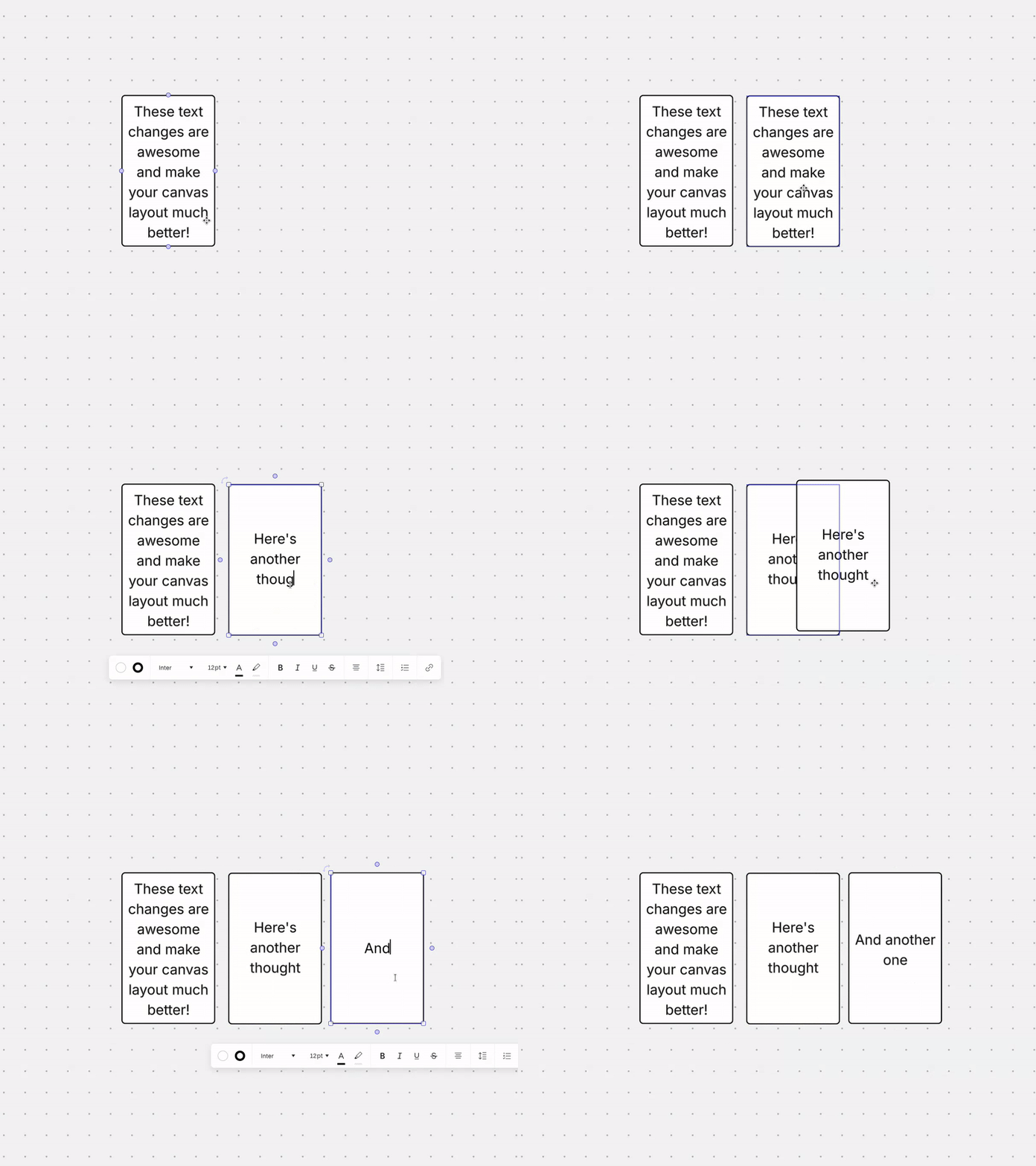
 

2. Dynamic List Spacing

Lists in Lucid currently default to single-spacing. We are considering updating this so that list spacing automatically matches your paragraph spacing settings. This change would allow for a more cohesive look across your entire document.

We’d love your thoughts:

  • How do you see these changes impacting your current diagramming process?
  • Are there specific workflows where you prefer the current or proposed behaviors?

All feedback—good or bad—is incredibly helpful as we refine these features. Share your thoughts in the thread below!  

Comments

Ambar D
Forum|alt.badge.img+10
  • Lucid community team
  • January 28, 2026
IdeaSeeking Feedback

aparrish
Lucid Legend Level 7
Forum|alt.badge.img+15
  • Lucid Legend Level 7
  • February 13, 2026

@kated Can you post screenshots or short videos so we can see what this looks like?


kated
Forum|alt.badge.img+1
  • Author
  • Lucid product team
  • February 13, 2026

@aparrish I just added one in!


Forum|alt.badge.img+13

Hello.

The image above is related to text editing since it appears when using the text box feature in Lucidspark. The circled feature shows a checkmark but when tapping on it there is only a bullet point and a numbered list option. Could the checkmark list option be added please or the checkmark icon removed. A checkmark/checklist feature could be a highly requested feature for quite a while so showing that there is one could be misleading. Was this an old feature that was removed and the icon was never updated? Could this be resolved please. 
Thank you for your time. Bye.


Forum|alt.badge.img+13

What if the text formatting toolbar was transformed into a slash command menu that appeared inside the text box? What if a new “convert to page” option was available just like how there is a “convert to card” option already? Perhaps the documents on the homepage could be renamed to boards since we are working on a Lucidspark and Lucidchart board- a universal board shared between the two? That way a new Lucid document feature could be introduced for the board/while working on the board that incorporated slash commands. 


Gordon
Forum|alt.badge.img+2
  • Lucid product team
  • February 17, 2026

Hello.

The image above is related to text editing since it appears when using the text box feature in Lucidspark. The circled feature shows a checkmark but when tapping on it there is only a bullet point and a numbered list option. Could the checkmark list option be added please or the checkmark icon removed. A checkmark/checklist feature could be a highly requested feature for quite a while so showing that there is one could be misleading. Was this an old feature that was removed and the icon was never updated? Could this be resolved please. 
Thank you for your time. Bye.

Hi Patrick,


Thanks for your feedback. My team is currently looking into improving the text editing experience. Your feedback is appreciated. 

Meanwhile, I want to mention that there is a checkbox shape in Lucidchart that you may be able to use. Let me know if you have more questions!

Best,