Idea

Easily change font size and add more formatting options to mind maps

Related products:Lucidspark
  • May 8, 2024
  • 7 replies
  • 155 views

Forum|alt.badge.img

I love the mindmap feature however the lack of the ability to easily change the font size is frustrating. I can do it node by node, but if I select the whole thing I can’t update (since it includes lines) and also new nodes are at the original (tiny) font size

May 8, 2024

@SarahW this is great feedback — thank you for taking the time to share in the community! We will put this on the list for future enhancements.

In the meantime, if you’d like to one-time, bulk-change the font size of a mind map you’ve already created, you are able to do this within Lucidchart. Here is a GIF showing how you can switch your editor from Lucidspark to Lucidchart, select the full mind map, change font size, and return to Lucidspark:


Comments

Forum|alt.badge.img+3
  • Lucid product team
  • May 8, 2024

@SarahW this is great feedback — thank you for taking the time to share in the community! We will put this on the list for future enhancements.

In the meantime, if you’d like to one-time, bulk-change the font size of a mind map you’ve already created, you are able to do this within Lucidchart. Here is a GIF showing how you can switch your editor from Lucidspark to Lucidchart, select the full mind map, change font size, and return to Lucidspark:


Forum|alt.badge.img
  • February 13, 2025

Upvote+1. In general I find the lack of formatting options for (Intelligent) Mind Maps frustrating. No boxes or bubbles, text formatting controls, or built-in features for making cross-links. Thanks


Ambar D
Forum|alt.badge.img+10
  • Lucid community team
  • February 20, 2025

Hi ​@mindmapper, thank you for adding to this thread with your feedback! I apologize for the frustration here, and I can certainly understand why this would be useful for you. 


Forum|alt.badge.img
  • October 16, 2025

Come on guys, it would be an easy fix to allow us to change the font size of a whole mind map and make it sticky so that new nodes follow the selected size.

😐

Same goes for org charts.


Ambar D
Forum|alt.badge.img+10
  • Lucid community team
  • October 16, 2025

Hi ​@50h9j, thank you for letting us know just how important this is to you. We’re very interested in your feedback and committed to continually improving our products.

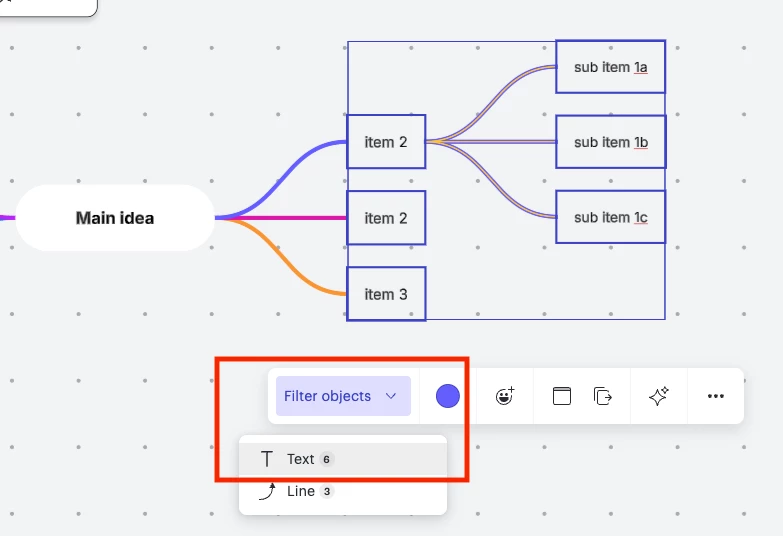
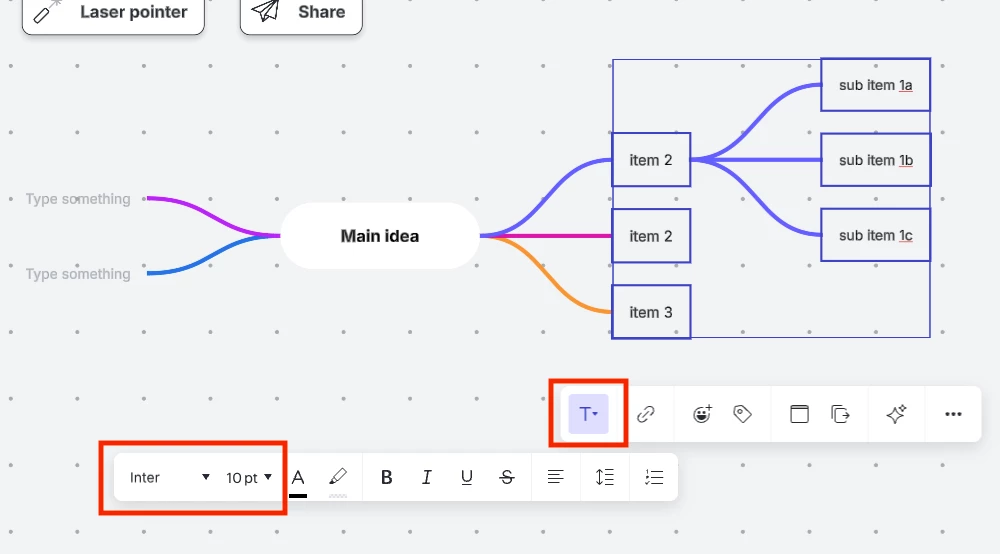
I wanted to mention that you’re able to change the font, text size, text color, and other attributes in bulk by following the instructions below:

  1. Select all the text you’d like to change
  2. Select Filter objects
  3. Select Text 
  4. Select the Text dropdown indicated by a capital T
  5. Adjust your font, text size, text color, and other attributes 


We encourage anyone who’s interested in additional mind map formatting options to upvote this post and share any additional details about what you’d like to see in this experience. We love hearing your feedback and ideas! The product team regularly reviews feedback within community comments like these as they continue to research new features and product enhancements. 

For more information about how we manage feedback in this community, please take a look at this post:


Forum|alt.badge.img
  • October 17, 2025

Thanks. That’s useful where you have a clean org chart with no other text elements (e.g. post-it notes), but doesn’t address the overall style (text to spacing ratio) as you build or add to one.


Ambar D
Forum|alt.badge.img+10
  • Lucid community team
  • October 17, 2025

I see ​@50h9j, thank you for adding that detail here! Your comments here as incredibly helpful to our product teams as they continue to evaluate user feedback via comments like yours.