Idea

Dynamic shapes (Progress Bars) that support more then one value

Related products:LucidchartLucidspark
  • April 30, 2025
  • 4 replies
  • 57 views

Forum|alt.badge.img+3

Currently to create a stacked bar graph using dynamic shapes its required to used multiple progress bars that have transparent set as the background colour. Ideally i could use a single dynamic shape that had a min, max, and then support any number of values to create a stacked bar
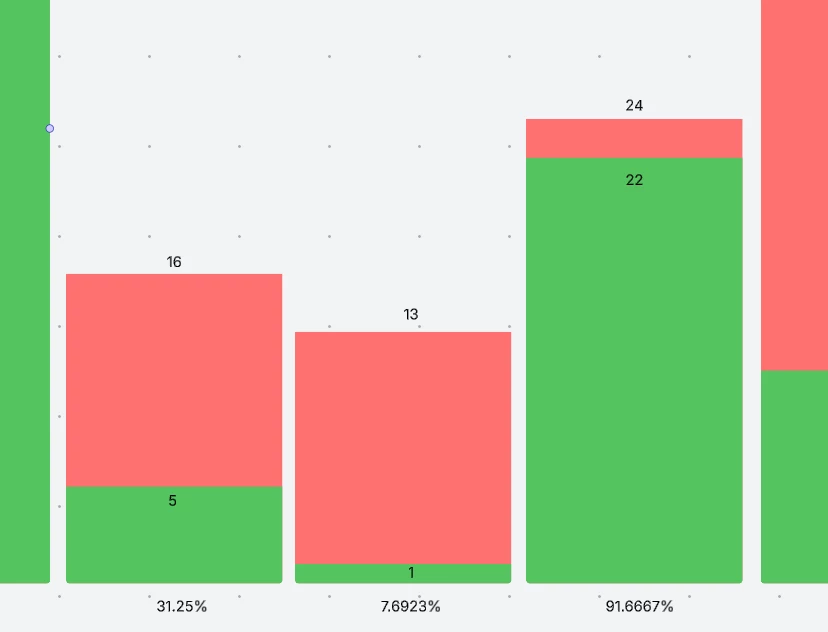


May 2, 2025

Hi ​@therrick, thanks so much for this great feedback and visual here! I could understand why this would be helpful. 

We encourage anyone else who’s interested in this to upvote this post and share any additional details about your use case or what you’d like to see in this experience. For more information about how we manage feedback in this community, please take a look at this post:


Comments

Ambar D
Forum|alt.badge.img+10
  • Lucid community team
  • May 2, 2025

Hi ​@therrick, thanks so much for this great feedback and visual here! I could understand why this would be helpful. 

We encourage anyone else who’s interested in this to upvote this post and share any additional details about your use case or what you’d like to see in this experience. For more information about how we manage feedback in this community, please take a look at this post:


Forum|alt.badge.img+3
  • Author
  • January 7, 2026

this seems to have recently been implemented 🎉 however it does seem to have broken the ability to use formula as values in dynamic bars
formula is selectable in the drop down but the value remains an number input


Ambar D
Forum|alt.badge.img+10
  • Lucid community team
  • January 9, 2026

Hi ​@therrick, thanks for following up here! Indeed you can now pass multiple values directly into dynamic shapes, and the shapes are no longer limited to a minimum or maximum value.

Regarding the formulas- I have reported this to our development team. I apologize for any disruption this may cause, and I will update this thread with any new information about a fix.

Please follow along on this thread for updates, and post any additional questions or concerns below. 


Forum|alt.badge.img+3
  • Author
  • January 13, 2026

The formulas can still be entered by using a work around of editing within the “Values” on the data page, 

additional side ideas

1.A quick we of setting the max value as the sum of all current values, I’m currently using the formula “=sum(index(VALUES(this."Values"),1))” which works and might not be optimal and may be difficult for someone who uses the formulas less to figure out


2.The ability to resize the formula window, it quickly fills up when using complex formula, its set by styling and can easily be adjusted using inspect, even just a toggle button to open it larger would suffice