Delivered

Changing default shapes for a "new" Document in Lucidchart

Related products:Lucidchart
  • August 8, 2018
  • 16 replies
  • 35 views

Jeremy H

Hi

 I work for a company and we all use Lucidchart.

Is there a way to get it to remember the shapes I have opened for the next “New” document im having to go in and open all the shape librarys I use for every new document

 So it would helpful if I could make it use the same set that I choose as I use the same ones all the time

 Is there any way to do this?

August 14, 2023

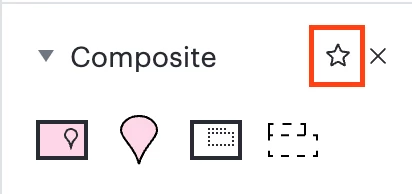
Hi everyone we're excited to let you know that in Lucidchart you can now favorite a shape library by clicking the star to the right of its name. Any favorited libraries will automatically be opened in all future documents you create. For more details check out our Welcome to Lucidchart help center article. Thank you for sharing your feedback in the community!

Comments

  • August 8, 2018

Hi Jeremy

Thanks for posting. At this point in time this is not a feature that we offer. A workaround could be to add the shapes you use most from each different shape library into one custom shape library so that you only need to add one shape library to each new document. Additionally you can create a blank template with shape libraries and default styles set then create new documents from that template rather than the normal new blank document process.

That being said we're always looking for ways to improve Lucidchart and your feedback is the best way for us to do that. Would you mind adding your idea to our feature request form? Thanks!


Fernando S
  • August 18, 2021

How come this obvious requirement is not yet available? :(


Jack K
  • August 19, 2021

Agree this should absolutely be an option. So annoying to have to change it manually every time. 


Ashley C
Forum|alt.badge.img+11
  • Lucid support team
  • August 20, 2021

Hi Fernando Hi Jack

Thanks for taking the time to post. The more we hear about the need for this feature the more critical we understand it is to prioritize. Submitting feedback to this form ensures our Product Developers hear it too.

I want to echo my colleague's workaround. You can add your favorite shape libraries to a document and save that document as a custom template by following these steps:

  1. In a new Blank Document click +Shapes.
  2. Search and select your most used shape libraries.
  3. Once they are added click File and Convert to Template.
  4. Follow the prompts and click Save.
  5. Create a new document but this time select Create from Template.
  6. In the Templates window select the Personal drop-down.
  7. Choose the template you just created and select Use Template.

Every time you create a new document using your template your shape libraries will be there automatically.

I hope this helps! Feel free to follow up in this thread with anymore questions about this.


Greg R
  • September 27, 2021

Hello! Is there a way to follow this feature and see if/when it would be implemented? It doesn't seem to be high up on Lucid's priority list seeing as it's been outstanding for 3 years but I was wondering if we could get insight as to why or see if it's even inn Lucid's backlog.


Abby S
Forum|alt.badge.img+11
  • Lucid community team
  • September 27, 2021

Hi Greg thanks for posting on the community and good question. This request has been passed on to our development team and every additional feature request submitted to the form linked above strengthens its case by helping us get a better understanding of how this feature would be used. However our development team has to rigorously prioritize what to work on based on the extent and criticality of an issue or feature request. Because of this there is not a timeline planned for implementing this feature at this time.

I am very sorry for the inconvenience. Please let me know if you have any additional questions or concerns. 


Spencer W
  • October 1, 2021

I would simply like to express my interest in this potential feature.


Micah
Forum|alt.badge.img+20
  • Lucid community team
  • October 1, 2021

@spencer w Thanks for continuing this thread! If you've not already please make sure to add details for your use case to the feature request form so our development team can continue to gain context about this feature!


sydney.matsko

I would like to continue this thread- we definitely need this feature! 


Micah
Forum|alt.badge.img+20
  • Lucid community team
  • November 24, 2021

Hi Sydney thanks for reviving this thread and voicing your interest! We'd also love if you'd share more in the feature request form linked above as that will help us share requests with the product team as they're prioritizing improvements to Lucidchart. Thanks so much!


M R
  • May 29, 2022

Echoing the above interest. Lucidchart's list of missing features is so short and seems to shrink all the time- thank you for that- but this seems like an oddball sort of outlier...it's a rare miss for the dev team but thank you for pushing it up their task list! 


Micah
Forum|alt.badge.img+20
  • Lucid community team
  • May 31, 2022

@m r Thanks for voicing your support here! We'll continue to let our development team know that this remains a popular important request.


Magdolna P
  • September 16, 2022

I would like to join to request this function as well


Coumba D
Forum|alt.badge.img+7
  • Lucid support team
  • September 16, 2022

Hello Madgdolna

Thanks for joining the conversation. Please add your feedback to our feature request form to advocate for this feature!

Thank you! 


Abby S
Forum|alt.badge.img+11
  • Lucid community team
  • August 14, 2023

Hi everyone we're excited to let you know that in Lucidchart you can now favorite a shape library by clicking the star to the right of its name. Any favorited libraries will automatically be opened in all future documents you create. For more details check out our Welcome to Lucidchart help center article. Thank you for sharing your feedback in the community!


Micah
Forum|alt.badge.img+20
  • Lucid community team
  • November 20, 2023
IdeaDelivered