Natalie B
January 27, 2021
Future Consideration

Change tiers in org charts in Lucidchart

Related products:Lucidchart
  • January 27, 2021
  • 54 replies
  • 1897 views

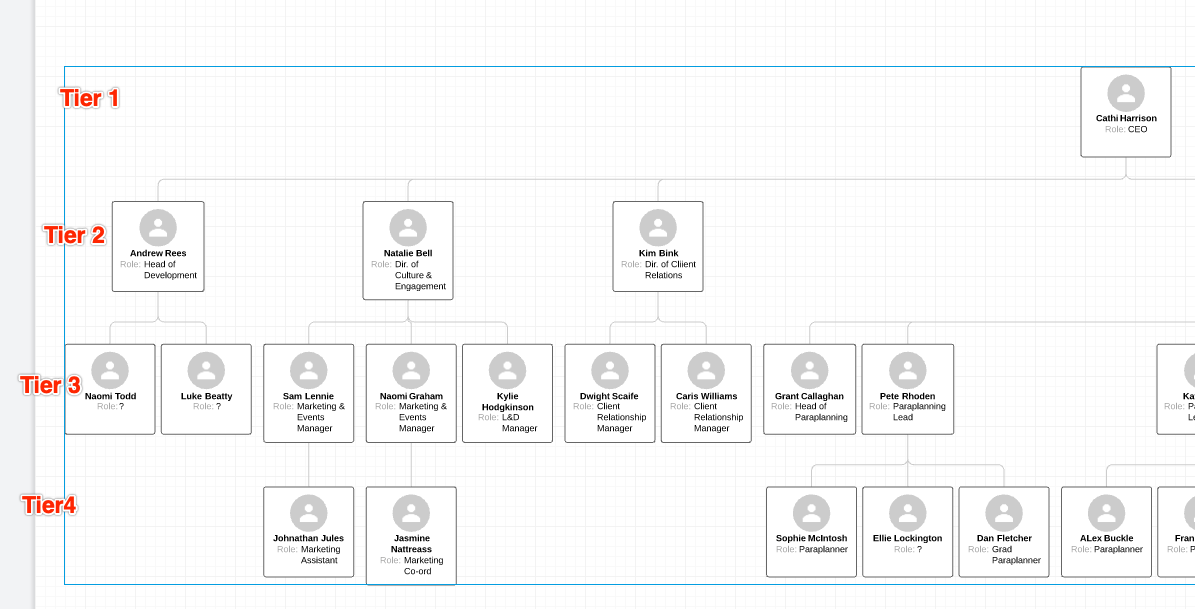
Are you able to manually state what 'tier' members of staff should be. We have instances where different tiers/levels report into the same staff.

For example this picture I need Head of Development to be Tier 3 (not 2) even though the direct report is still into Tier 1. The child links of Head of Development should also be moved down to Tier 4 (not 3).
 

Pinned Reply By Chloe

Thanks to all who have commented here! This is a great request and one we’ve seen consistently, so we will keep this high on our list of future considerations. Thanks again for taking the time to share context with us.

Comments

March 3, 2025

Hello ​@Chloe, hello ​@Micah,


we are currently in the process of deciding on an organizational chart tool in our company and the above described requirement is a must-have criterion. Would you please announce, when the feature will be realized? Thank you!


Ambar D
Lucid community team
March 5, 2025

Hi all, I am truly sorry for the frustration here. At this time we don’t have an update to share regarding this feature. The best way to indicate support for this feature to be implemented is to upvote this post.

For more information about how we manage feedback in this community, please take a look at this post:


March 5, 2025

Please make this a thing, displaying an org of 300-400 people with horizontal orientation at mid-levels is visually-unfunctional.

Ambar D
Lucid community team
March 7, 2025

Thank you for adding your feedback to this thread ​@CJ1! I can certainly see how this would be beneficial for your workflow.  

March 28, 2025
This feature is really missing... The request is starting to get dated despite strong demand.
March 28, 2025

 .

Ambar D
Lucid community team
March 28, 2025

Hi ​@Sami1260, thank you for adding to this thread and indicating your support for this! I would like to shed some light on the “future consideration” status of this idea. 

This status means that while the product development team isn’t currently working on this, they’re still interested in hearing about what you’d like to see implemented and they may revisit this in the future. Upvoting this post, and if you’re willing, adding detailed feedback are great methods of showing that this feature is important to you!

We encourage everyone to continue voicing their ideas in this community. If you’d like to learn more, I recommend checking out this post:


April 1, 2025


Hello ​@Ambar D , thank you for your reply. What we would like is to be able to optionally specify the tier in the data or at least to be able to move the forms freely while keeping the same hierarchical superior.


Ambar D
Lucid community team
April 10, 2025

Hi ​@Sami1260, thank you so much for leaving these additional details and feedback, along with your example. Your comments here are helpful to our product teams as they continue to research new product features and enhancements.

April 11, 2025

I just wanted to add this picture to this request.

We need to make this kind of visualization possible without the blank boxes.
The hierachy can be visualized by the different tiers. We would like to add a number to our excel file. Each number stands for one leve for example 1=CEO. The number is the identiefier in which level the box will be displayed.
We don’t want to manually add blank boxes to our org chart. So please give us a way to aumatically create hierachical structure.