Idea

Background Color Opacity

Related products:Lucidchart
  • February 5, 2022
  • 2 replies
  • 17 views

Christian J
Forum|alt.badge.img

You seem to have removed the background color opacity?

According to your representative you can now control the opacity from the 'Shape Options'. But the problem is that this reduces the opacity for the text as well? Which is NOT the desired outcome!

This is a major functional regression in my opinion. Please restore how it was or equivalent functionality. This is something I would manage in almost ALL my drawings.

Disappointed user!

Comments

Arne S
  • February 6, 2022

Came in here to post a request to return the visibility parameter to where it was.... so I totally agree with Christian J!
I use this function to "layer" text boxes with various colors and degrees of visibility over one another.
Please restore the function to the easily accessible slider that was at the bottom of the color-selection box.

Thanks!!
Best regards from a not quite "disappointed user" more of a surprised one!
Why was that much used (by me at least) moved to a less accessible place?


Abby S
Forum|alt.badge.img+11
  • Lucid community team
  • February 8, 2022

Hi Christian and Arne

Thanks for posting in the community! I'm sorry for the delay getting back to you over the weekend.

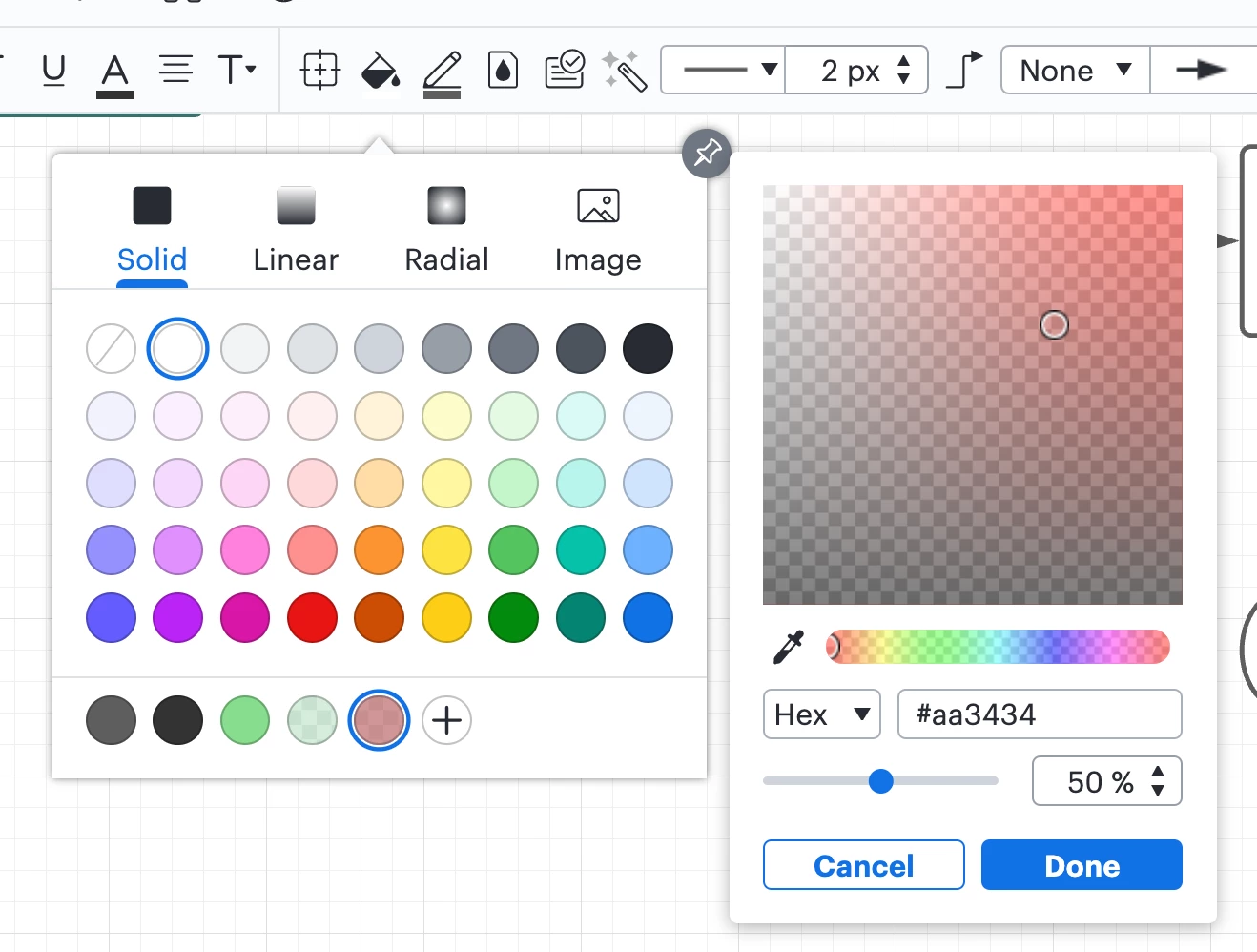
You can still control the opacity of a shape fill without impacting the opacity of the text on the shape by following these steps:

  1. Open the Fill Color menu
  2. Click the + Plus button at the bottom of the Fill Color menu
  3. This will open a panel where you can adjust the opacity of the shape's fill color without impacting the opacity of the shape or text on it

If you aren't able to find this option or it isn't working as intended for you please let me know.

That being said as you mentioned this feature is still less accessible than it was before. Please add your feedback about the changes to our color picker and to our feature feedback form. Ideas submitted to this form are passed on to our product development team for their consideration. 

At Lucid take feature requests very seriously and are continuously looking for how we can make Lucidchart more useful and effective for our users.

Thanks for sharing your feedback and I'm sorry for the inconvenience!