Delivered

Automatically resize frames and containers based on the shapes inside them

Related products:Lucidspark
  • September 7, 2024
  • 4 replies
  • 90 views

Hello.

Frames and containers allow us to add content within but when we add more we have to manually readjust the size by making them bigger. 
There is an auto-resize feature for text feature available for the tables feature. What if that feature was made available for frames and containers and applicable to objects in general added within? 
For example, if we add a frame around a dynamic table that add more rows or columns that dynamic table will eventually outgrow the frame and we will have to manually make the frame bigger to compensate. What if the app worked alongside us and took care of those adjustments for us while we focus on working?

Thank you for your time. Bye.

October 6, 2025

Hi ​@kyle_b, thanks for adding to this thread with your feedback!

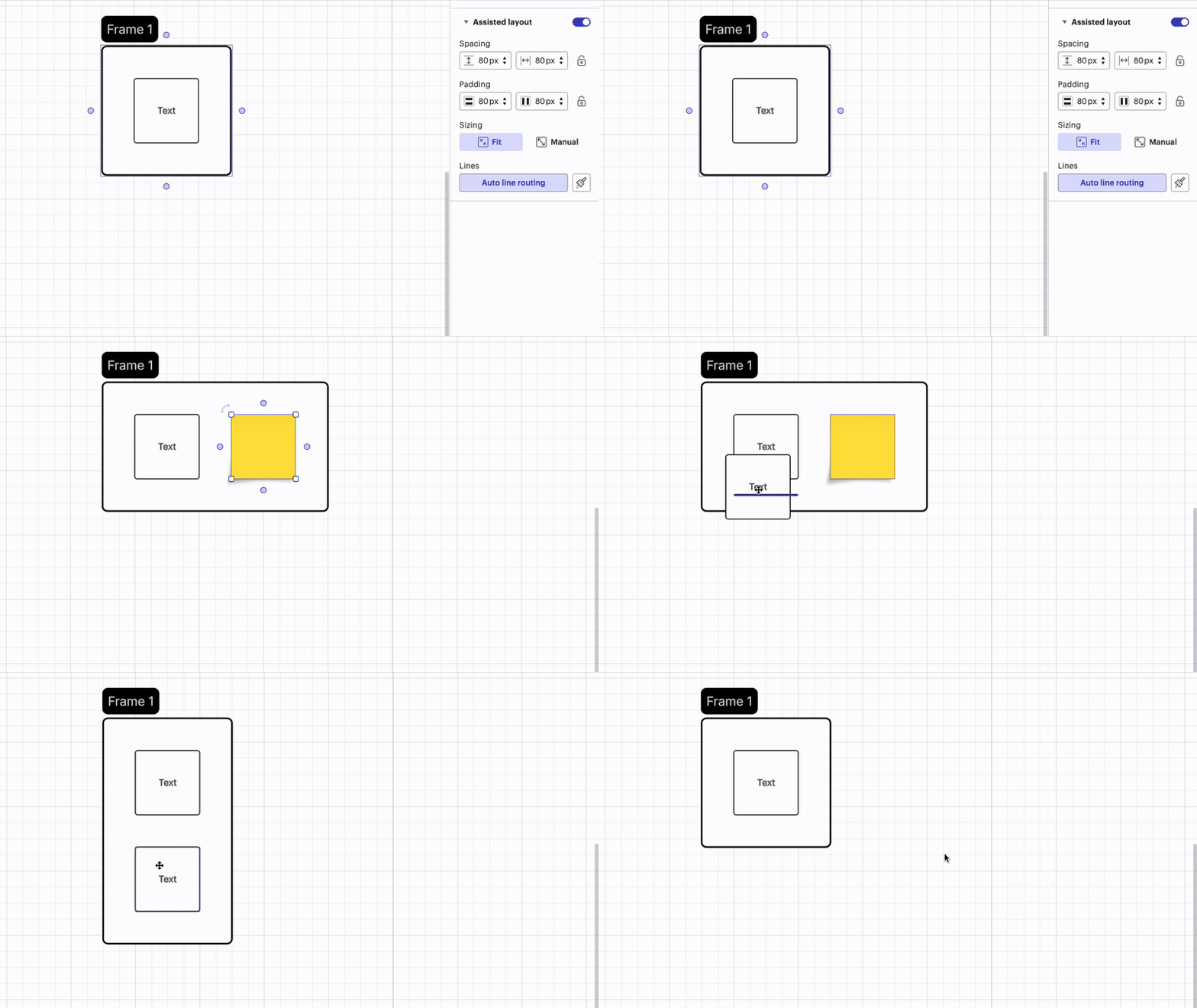
With assisted layout, frames in Lucid can now automatically resize to match the shapes inside. In the example below, notice how the frame automatically expands to add room for the sticky note and additional shape. When those shapes are deleted, the frame then automatically decreases in size. 

To try this out in your Lucid canvas, you can follow these steps:

  1. Add a frame, container, or swimlane to your Lucid document
  2. Follow these steps to apply assisted layout 
  3. Under ‘Sizing’, ensure that ‘Fit’ is selected


To learn more about applying assisted layout to shapes in Lucid, I recommend checking out these resources:

Use assisted layout to organize content in Lucid article from the Help Center


Please let me know if you have any additional questions or concerns! Happy to help! 

Comments

Kelsey Gaag
Forum|alt.badge.img+16
  • Lucidite
  • 1128 replies
  • September 9, 2024

 Hi, thanks for this idea! We encourage anyone else who’s interested in this to upvote this post and share any additional details about your use case or what you’d like to see in this experience. For more information about how we manage feedback in this community, please take a look at this post:


Forum|alt.badge.img
  • 1 reply
  • October 2, 2025

It’s surprising to me that frames can’t be toggled on to automatically resize to fit the contents (both expanding and shrinking). I’d love this feature!


Ambar D
Forum|alt.badge.img+10
  • Lucid community team
  • 1163 replies
  • October 6, 2025

Hi ​@kyle_b, thanks for adding to this thread with your feedback!

With assisted layout, frames in Lucid can now automatically resize to match the shapes inside. In the example below, notice how the frame automatically expands to add room for the sticky note and additional shape. When those shapes are deleted, the frame then automatically decreases in size. 

To try this out in your Lucid canvas, you can follow these steps:

  1. Add a frame, container, or swimlane to your Lucid document
  2. Follow these steps to apply assisted layout 
  3. Under ‘Sizing’, ensure that ‘Fit’ is selected


To learn more about applying assisted layout to shapes in Lucid, I recommend checking out these resources:

Use assisted layout to organize content in Lucid article from the Help Center


Please let me know if you have any additional questions or concerns! Happy to help! 


Ambar D
Forum|alt.badge.img+10
  • Lucid community team
  • 1163 replies
  • October 6, 2025
IdeaDelivered