Delivered

Add an option to play music during a timer in Lucidspark

Related products:Lucidspark
  • December 21, 2023
  • 5 replies
  • 379 views

Forum|alt.badge.img

It would be great to have *music* in lucidspark, like miro has, connected with the timer. This feature is extremely valuable as facilitator and participant, and is the #1 thing I'm missing so far in lucid! I know that lucid is developing extremely FAST so I am hopeful this will come soon 🤞 


September 23, 2025

HI ​@LizI, ​@Leeanne, ​@CHILL2U, ​@spotiifyapk, I have good news!

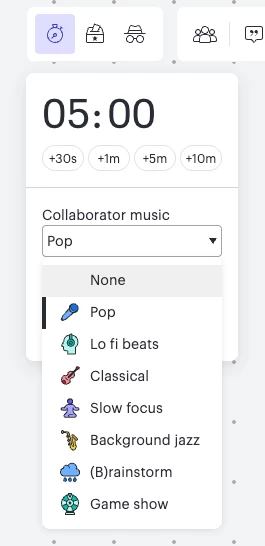
Lucid does now support adding music to the timer in Lucidspark. You chan navigate to the timer button on the top right of your Lucidspark board and choose from a variety of music genres as shown below! To learn more, I recommend checking out the Set a timer article from the Lucid Help Center. 


Comments

Forum|alt.badge.img
  • July 11, 2024

Surprised there’s not more votes on this one, but I’m a Massive plus one to this - as a previous user of Miro, the music was so good at removing the awkward silence when doing activities and using the timer.  I really hope this is on your roadmap 🤞🙏


Forum|alt.badge.img
  • July 11, 2024

I agree, this should be a “Must Have” capability and opportunity for Lucid.

Having the ability to play music during facilitation sessions takes the moment to another level!!


Forum|alt.badge.img

Currently, Lucidspark doesn't offer built-in volume control for timer music, but here are several ways to manage or add background music during your timer sessions:

Option 1: Use Lucidspark's Default Timer Music (No Volume Control)

  1. Start the timer (/timer command or toolbar icon).

  2. The built-in music will play at a fixed volume.

    • Workaround: Adjust your system volume or browser tab volume (right-click Chrome tab > "Mute site" if needed).

Option 2: Play Music Externally (Recommended for Control)

A. Spotify/YouTube in Another Tab

  1. Open Spotify/YouTube in a separate tab or device.

  2. Play a playlist and adjust volume independently.

  3. Start Lucidspark’s timer without sound (mute one tab).

B. Share Audio via Zoom/Teams

  1. Play music from any app (Spotify, Apple Music, etc.).

  2. Control volume via your music app or meeting controls.

Option 3: Embed Music in Lucidspark (Limited)

  1. Embed a Spotify playlist (paste link → displays as playable card).

    • Limitation: No autoplay; users must click play manually.

  2. Add a music link (e.g., YouTube) as a sticky note with instructions.

Feature Request to Lucid

Ask Lucid to add timer music controls:

  1. Click Help (?) → Submit Feedback.

  2. Request: "Adjustable timer music volume" or "Custom audio upload."


Ambar D
Forum|alt.badge.img+10
  • Lucid community team
  • September 23, 2025

HI ​@LizI, ​@Leeanne, ​@CHILL2U, ​@spotiifyapk, I have good news!

Lucid does now support adding music to the timer in Lucidspark. You chan navigate to the timer button on the top right of your Lucidspark board and choose from a variety of music genres as shown below! To learn more, I recommend checking out the Set a timer article from the Lucid Help Center. 


Ambar D
Forum|alt.badge.img+10
  • Lucid community team
  • September 23, 2025
IdeaDelivered