
Solved
Standard Import - Table Shape - Borders and Raw HTML Rendering
I am trying to create a table using the Standard Import Format, and I see in the documentation for the Table Library that I should be able to set whether the horizontal borders are visible with the fields verticalBorder and horizontalBorder.
I send this JSON to the https://api.lucid.co/v1/documents and the document was successfully created.
{
  "version": 1,
  "pages": [
    {
      "id": "page1",
      "title": "Current",
      "shapes": [
        {
          "id": "shape1",
          "type": "table",
          "boundingBox": {
            "x": 1210,
            "y": 418,
            "w": 334,
            "h": 148
          },
          "style": {
            "rounding": 0,
            "textColor": "#FFFFFF",
            "stroke": {
              "color": "#5E5E5E",
              "width": 2,
              "style": "solid"
            }
          },
          "rowCount": 4,
          "colCount": 2,
          "cells": [
            {
              "xPosition": 0,
              "yPosition": 0,
              "style": { "fill": { "type": "color", "color": "#FFFFFF" } },
              "text": "<span style='font-family: Inter, sans-serif; text-align: left;'>Key1</span>"
            },
            {
              "xPosition": 1,
              "yPosition": 0,
              "style": { "fill": { "type": "color", "color": "#FFFFFF" } },
              "text": "Value1"
            },
            {
              "xPosition": 0,
              "yPosition": 1,
              "style": { "fill": { "type": "color", "color": "#E6E6E6" } },
              "text": "Key2"
            },
            {
              "xPosition": 1,
              "yPosition": 1,
              "style": { "fill": { "type": "color", "color": "#E6E6E6" } },
              "text": "Value2"
            },
            {
              "xPosition": 0,
              "yPosition": 2,
              "style": { "fill": { "type": "color", "color": "#FFFFFF" } },
              "text": "Key3"
            },
            {
              "xPosition": 1,
              "yPosition": 2,
              "style": { "fill": { "type": "color", "color": "#FFFFFF" } },
              "text": "Value3"
            },
            {
              "xPosition": 0,
              "yPosition": 3,
              "style": { "fill": { "type": "color", "color": "#E6E6E6" } },
              "text": "Key4"
            },
            {
              "xPosition": 1,
              "yPosition": 3,
              "style": { "fill": { "type": "color", "color": "#E6E6E6" } },
              "text": "Long Value4 fitting in a wider row than usual"
            }
          ],
          "userSpecifiedCols": [
            {
              "index": 0,
              "size": 83
            },
            {
              "index": 1,
              "size": 251
            }
          ],
          "userSpecifiedRows": [
            {
              "index": 3,
              "size": 53
            }
          ],
          "verticalBorder": false,
          "horizontalBorder": false,
          "customData": []
        }
      ],
      "lines": []
    }
  ]
}
However, the table renders with all borders enabled. Did I set this parameter correctly?
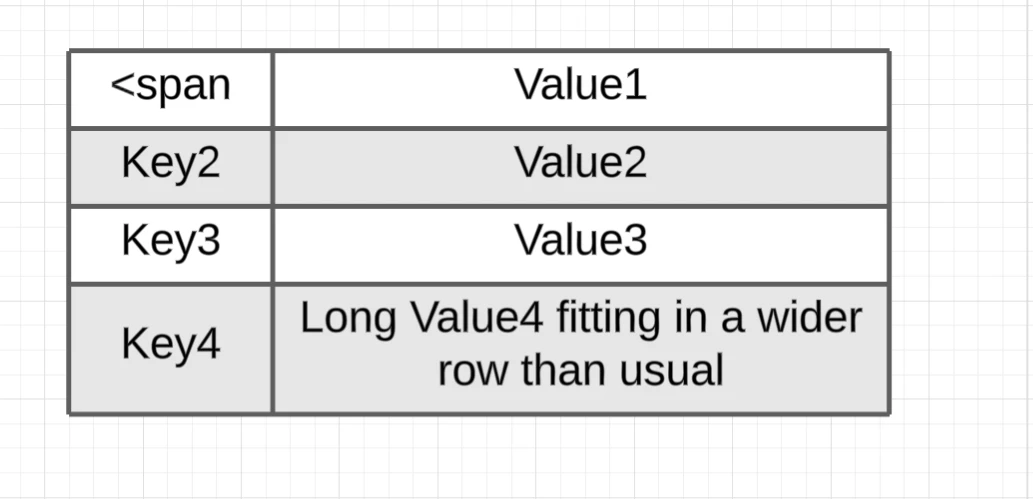
I also have also followed the reference for the Text field and attempted to pass in raw HTML into the cell to choose a specific font and text alignment, since this can’t be specified in the Style field.
HTML is parsed for the standard Rectangle shape, but handled as regular text for the Table Cell. Is this intended?

 Your privacy choices


