
Question

Standard Import - Swim Lanes - Text Color

  • July 20, 2026
  • 5 replies
  • 74 views

Forum|alt.badge.img+1

Hi,

I uploaded this JSON to the Standard Import API, specifying white text on a colored background on the titleBar.

{
"version": 1,
"pages": [
{
"id": "page1",
"title": "Current",
"shapes": [
{
"id": "swimlane0",
"type": "swimLanes",
"boundingBox": {
"x": 0,
"y": 0,
"w": 350,
"h": 160
},
"style": {
"rounding": 5,
"stroke": {
"color": "#46477e",
"width": 2,
"style": "solid"
},
"textColor": "#FFFFFF"
},
"vertical": true,
"titleBar": {
"height": 40,
"verticalText": false
},
"lanes": [
{
"title": "SwimLane",
"width": 350,
"headerFill": "#5E5E5E",
"laneFill": "#00000000"
}
],
"magnetize": true,
"actions": [],
"customData": [],
"zIndex": 1
}
],
"lines": []
}
]
}
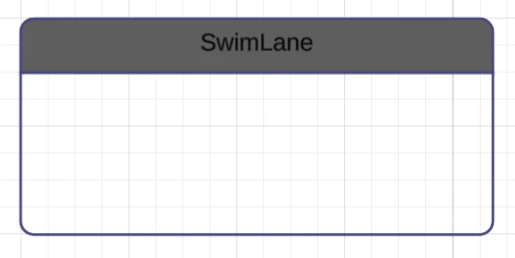
The chart was successfully created, but the text still renders with the default black color.

Is the shape’s style.textColor property intended to affect the titleBar color?


- Alex

Comments

aparrish
Lucid Legend Level 7
Forum|alt.badge.img+18
  • Lucid Legend Level 7
  • July 21, 2026

@alex.warren I don’t know the exact answer to your question but can point you to the right direction. Check out https://lucid.readme.io/docs/overview-si#example-import-files and https://developer.lucid.co/docs/welcome.

Also, just in case you wanted to use JSON with AI I wanted to address that JSON comes with “format tax,” which can mean more iterations to get what you desire from AI. If your end goal is to work with AI, then I recommend YAML, which will result in expending fewer tokens to get to your desired output, which will save time and money.


Forum|alt.badge.img+1
  • Author
  • July 21, 2026

Hi Aparrish,


I am using Standard Import which I believe only accepts JSON . I didn’t see anything in the docs about alternative file formats like YAML. Could you please share the documentation for that?

I am referencing https://developer.lucid.co/docs/reference-si#style for the shared style.textColor property, which I have already used for other shapes.


Michael B
Forum|alt.badge.img+4
  • Lucid product team
  • July 21, 2026

Hello Alex,

I am investigating the issue now.  I can confirm that the endpoint only accepts JSON at this time. I believe the suggestion for yaml would apply to the response body more than the request body. I could be wrong though. Everything with AI changes hourly.


Michael B
Forum|alt.badge.img+4
  • Lucid product team
  • July 21, 2026

I have found the cause. There are a handful of “complex” shapes that were developed more recently with a better design for rendering text and styling. Those shapes are not getting their new properties populated correctly.

I am working on a fix and will post here when its deployed to production.


Forum|alt.badge.img+1
  • Author
  • July 21, 2026

While you’re at it, I also noticed another small issue with the swimLanes:

The height parameter on the titleBar is mandatory, but not respected for swimLanes with height less than 160px. Under that height, the header shrinks automatically and reduces the overall height of the shape from the specified height.

I would like to be able to create a smaller swimLane with a height of 136px while maintaining a titleBar height of 40px to match other larger swimLanes. I am trying to align a table inside of the swimLane to essentially recreate the ERD shapes, so the automatic resizing is making aligning other shapes into this container difficult.

I think that removing this dynamic resizing would greatly improve the flexibility of this shape for the Standard Import. It is a very close alternative to the ERD shapes


Edit: I can move this to a seperate post if that would be appropriate