Jun 26, 2025 2:16 PM UTC
Solved

Specifying shapes to return with CONNECTED forumla

Is it possible to return only shapes of a given type? Will the CONNECTED formula work with some sort of filter?

Richard Udell
Lucid support team
Jul 14, 2025 3:29 PM UTC

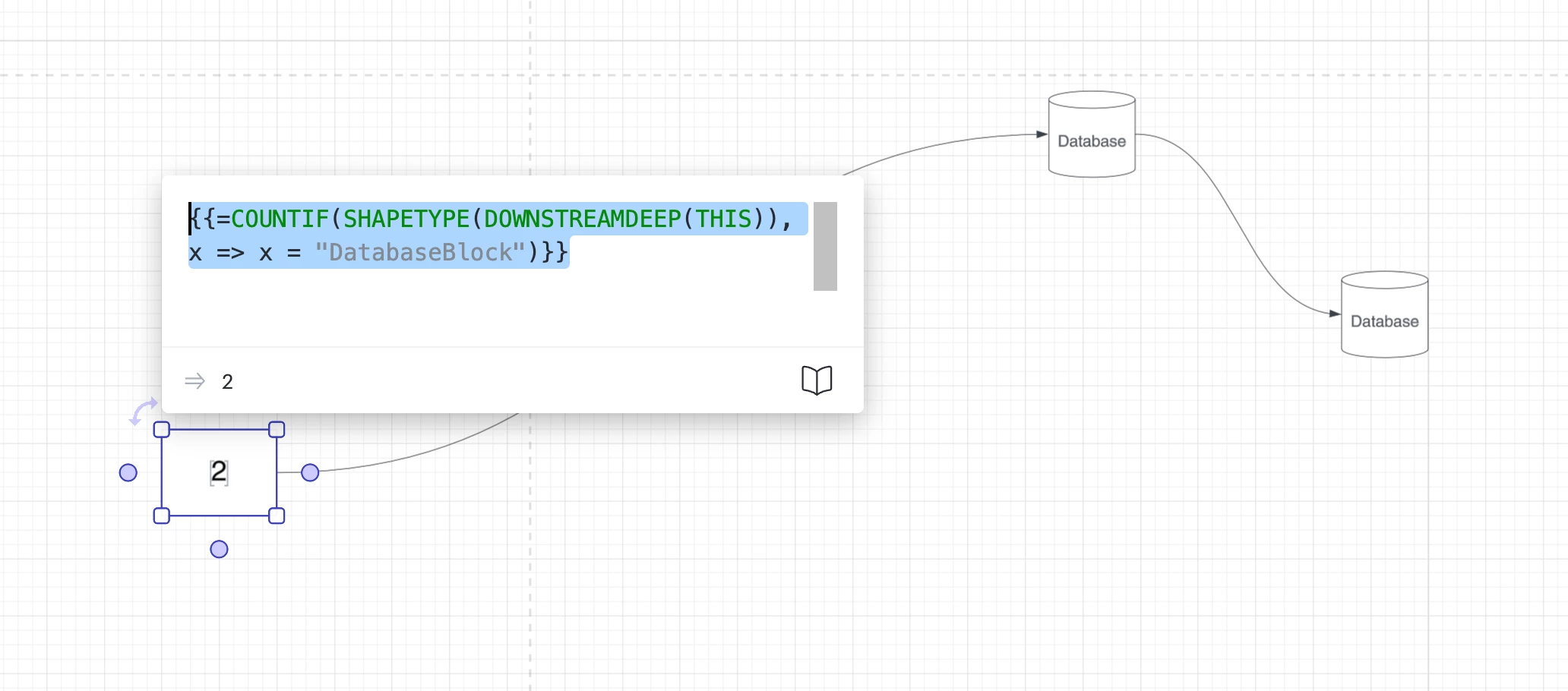
Hi ​@toddwerts , using {{=SHAPETYPE(THIS)}} on a Database shape we learn that it’s actually called “DatabaseBlock”. Therefore, this formula below should capture how many DatabaseBlocks are downstream from your initial shape: 

{{=COUNTIF(SHAPETYPE(DOWNSTREAMDEEP(THIS)), x => x = "DatabaseBlock")}}

Give this a try and let me know if more questions come up!


Comments

Richard Udell
Lucid support team
Jul 4, 2025 12:04 AM UTC

Hi ​@toddwerts , great question! I believe this formula might do the trick:


=COUNTIF(SHAPETYPE(CONNECTED(THIS)), x => x != "Line")

Give it a try and let us know how it goes. 

Translate
toddwertsAuthor
Jul 7, 2025 2:22 PM UTC

Hi ​@toddwerts , great question! I believe this formula might do the trick:


=COUNTIF(SHAPETYPE(CONNECTED(THIS)), x => x != "Line")

Give it a try and let us know how it goes. 

Bear with me, I’m not an experienced developer. Where do I specify the “shapetype?”

Translate
toddwertsAuthor
Jul 11, 2025 1:32 PM UTC

Hi ​@toddwerts , great question! I believe this formula might do the trick:


=COUNTIF(SHAPETYPE(CONNECTED(THIS)), x => x != "Line")

Give it a try and let us know how it goes. 

​@Richard Udell I used this: =COUNTIF(SHAPETYPE(CONNECTED(DATABASE)), x => x != "Line")

My test had 4 connections to databases, but the value only returned “1.” 

Translate
Richard Udell
Lucid support team
Jul 14, 2025 3:29 PM UTC

Hi ​@toddwerts , using {{=SHAPETYPE(THIS)}} on a Database shape we learn that it’s actually called “DatabaseBlock”. Therefore, this formula below should capture how many DatabaseBlocks are downstream from your initial shape: 

{{=COUNTIF(SHAPETYPE(DOWNSTREAMDEEP(THIS)), x => x = "DatabaseBlock")}}

Give this a try and let me know if more questions come up!


Translate
toddwertsAuthor
Jul 15, 2025 12:27 PM UTC

​@Richard Udell That’s perfect, thank you. It does however raise another question……..where would I have found that the shape’s actual name is “databaseBlock?” When you hover over it in the shape library it simply says “Database” so, since I will need this capability repeatedly, where do I find a list of the actual shape names so I can repeat this with other shape types?

Translate
Richard Udell
Lucid support team
Jul 15, 2025 12:42 PM UTC

I had the same question when digging into this! You can inspect a shape’s shapetype to confirm how it’s referenced by using this formula.

=SHAPETYPE(THIS)


Translate
toddwertsAuthor
Jul 18, 2025 11:08 AM UTC

I had the same question when digging into this! You can inspect a shape’s shapetype to confirm how it’s referenced by using this formula.

=SHAPETYPE(THIS)


​@Richard Udell Good morning Richard, unfortunately, that did not work. It “appears” to be returning the correct number when you put in the formula in the modal (as seen below), but then it doesn’t show the number on the display but shows the formula instead. Not sure what’s up there………. If you’re so inclined, the other issue I’m having is it will only display 20 or so system names. Even when you look at the Contextual panel it lists only 20 then … Any tricks for making it show the entire list of 61 (in this case)? Perhaps a Dynamic shape?


Translate
Richard Udell
Lucid support team
Jul 18, 2025 5:23 PM UTC

Happy to help clarify a couple things here! If I’m reading your screenshot right, the #ERROR looks like it’s coming from the curly braces. To fix the error try removing the curly braces when you’re entering the formula in the contextual panel. The {{=formula}} format is only for when you're inserting a formula into a text field on the canvas.

Also, could you share the formula you're using to pull in the system names? I'm curious if we're running into an output length limit (which if true, I wasn’t aware was even a thing) or if something else might be going on.

If it is a length issue, one workaround might be breaking the system shapes into separate containers and grabbing the lists in smaller chunks.

Let me know what you find - happy to keep digging!

Translate
toddwertsAuthor
Jul 31, 2025 12:52 PM UTC

Happy to help clarify a couple things here! If I’m reading your screenshot right, the #ERROR looks like it’s coming from the curly braces. To fix the error try removing the curly braces when you’re entering the formula in the contextual panel. The {{=formula}} format is only for when you're inserting a formula into a text field on the canvas.

Also, could you share the formula you're using to pull in the system names? I'm curious if we're running into an output length limit (which if true, I wasn’t aware was even a thing) or if something else might be going on.

If it is a length issue, one workaround might be breaking the system shapes into separate containers and grabbing the lists in smaller chunks.

Let me know what you find - happy to keep digging!

Actually, support personnel helped me solve the “count limit” issue. For reference, I was instructed to use a JOIN and that did the trick! For reference, here’s the formula I was instructed to utilize: =JOIN(CONNECTED, ", ") Since I only have databases connected currently, that did the trick. I’ll need to add your shapetype delineating formula above soon as I’ll have more than databases connected to that “environment” object.

Thanks Again!!!!

Translate
Richard Udell
Lucid support team
Jul 31, 2025 9:59 PM UTC

That's great news! I'm glad to hear you got the list display issue sorted out. Let us know if anything else comes up. We’re here to help!

Translate