After following the steps for integrating with ServiceNow: we get the following error: Error occured while creating Business Application Hierarchy in Lucidchart. Please try again.
ServiceNow is describing the issue as a Token issue. Is anyone familiar with how to solve this?
Lucid has worked with ServiceNow on triaging customer issues setting up the integration, and we’ve learned there are three additional checks that may help get the integration set up properly:
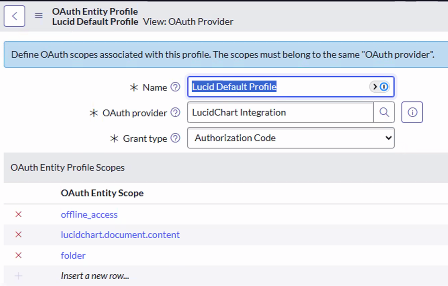
Make sure the Grant Type is set to Authorization code
Make sure the integration has the scopes:
offline_access
lucidchart.document.content (you might be able use lucidchart.document.app.folder instead; however, we have not tested this)
folder (you might be able to use folder:readonly; however we have not tested this)
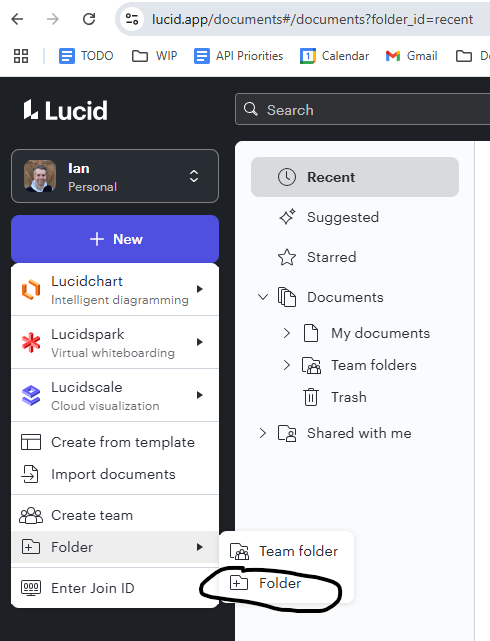
In Lucid, make sure you have created a normal folder in your Lucid home page (e.g. the page that pop ups when you open Lucid.app - see image below). What we recently discovered was that the ServiceNow integration hits Lucid’s API looking for a list of folders in the Lucid user’s root Lucid directory/folder. If there is none, the integration returns an error claiming there was an issue with the OAuth token (which unfortunately is an incorrect error message). At the time of writing this post, the requirement to have a Lucid folder created in your Lucid root directory is not documented in ServiceNow documentation.
Note that this information is up-to-date as April 2025, but things may change over time. Also, please note that ServiceNow owns the integration and you should first reach out to ServiceNow with any issues setting up or using the integration.
ServiceNow screen associated with #1 and #2, as of April-2025How to create a folder in your root directory in Lucid.app (#3), as of April-2025
ServiceNow built and manages the Lucidchart <> ServiceNow integration. ServiceNow would be best to triage and support the issue you’re seeing.
However, I will note that the ServiceNow documentation (at this time) for setting up this integration is outdated at some parts. Something that may be creating errors that is not mentioned in the ServiceNow documentation (at this time) is how to configure things so more Lucid users can use the integration. I’ll explain that below.
When a Lucid user creates an OAuth 2.0 Client in the Lucid Developer Portal, by default no other Lucid user will be able to create an OAuth 2.0 token from that Client. An OAuth token is needed for a Lucid user to use an integration like ServiceNow. In other words, by default, only the Lucid user that creates the OAuth client can use the ServiceNow integration. There are two options to allow other users (e.g. users other than the Lucid user who created the OAuth 2.0 Client) to use the integration:
You can privately publish the Lucid app which houses the OAuth 2.0 token. This will allow any Lucid user at your company (specifically, any Lucid user on the same Lucid team/enterprise account) to use the integration
You could add specific Lucid users as collaborators to the Lucid app that houses the OAuth token. This allows you to specifically choose which Lucid users could use the ServiceNow integration
To be clear Ashish, I am not saying the steps above will solve the issue you’re seeing (I’d recommend you reach out to ServiceNow). However, this is one “pro-tip” that may help you properly configure the app.
Lucid has worked with ServiceNow on triaging customer issues setting up the integration, and we’ve learned there are three additional checks that may help get the integration set up properly:
Make sure the Grant Type is set to Authorization code
Make sure the integration has the scopes:
offline_access
lucidchart.document.content (you might be able use lucidchart.document.app.folder instead; however, we have not tested this)
folder (you might be able to use folder:readonly; however we have not tested this)
In Lucid, make sure you have created a normal folder in your Lucid home page (e.g. the page that pop ups when you open Lucid.app - see image below). What we recently discovered was that the ServiceNow integration hits Lucid’s API looking for a list of folders in the Lucid user’s root Lucid directory/folder. If there is none, the integration returns an error claiming there was an issue with the OAuth token (which unfortunately is an incorrect error message). At the time of writing this post, the requirement to have a Lucid folder created in your Lucid root directory is not documented in ServiceNow documentation.
Note that this information is up-to-date as April 2025, but things may change over time. Also, please note that ServiceNow owns the integration and you should first reach out to ServiceNow with any issues setting up or using the integration.
ServiceNow screen associated with #1 and #2, as of April-2025How to create a folder in your root directory in Lucid.app (#3), as of April-2025
A Lucid or airfocus account is required to interact with the Community, and your participation is subject to the
Supplemental Lucid Community Terms.
You may not participate in the Community if you are under 18. You will be redirected to the Lucid or airfocus app to log in.
A Lucid or airfocus account is required to interact with the Community, and your participation is subject to the
Supplemental Lucid Community Terms.
You may not participate in the Community if you are under 18. You will be redirected to the Lucid or airfocus app to log in.


 Your privacy choices


