Solved

Viewing Flowcharts Without Color

  • August 2, 2024
  • 4 replies
  • 51 views

Forum|alt.badge.img+1

Currently my canvas does not show shape colors - not sure why. It is very difficult to review the flow chart as I have to flip to PDF export to see how the colors are being shown. Can anyone provide support as to why the shape colors only show up in the PDF export and not in the canvas? 
Best answer by Shantel Gillette

Good afternoon,

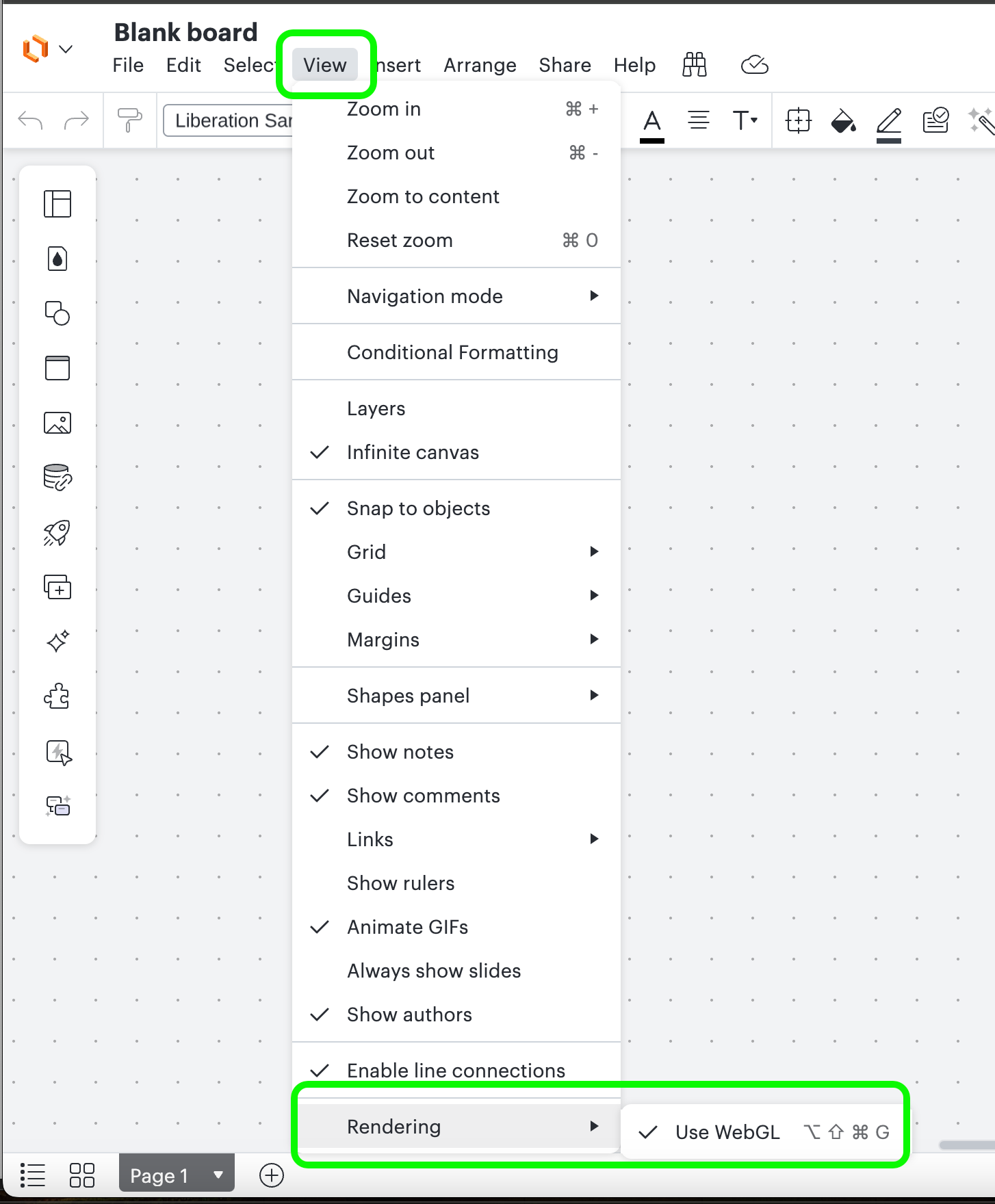
It’s possible that toggling the rendering option for webGL may resolve this issue for you. If you go to the top menu, in the View section, then down at the bottom of the list for rendering toggle the option for webGL it might resolve the issue. Let me know if that fixes the problem for you. 


Comments

Humas1985
Lucid Legend Level 10
Forum|alt.badge.img+24
  • Lucid Legend Level 10
  • August 2, 2024

Hi @S Cohos 

Could you attempt to use the Fill Color and Edit Styles features to see if you're able to fill in colors? If you're still experiencing issues, please share a screenshot to help me better understand the problem. Additionally, try restarting your browser, as this often resolves the issue


Hope this helps - Happy to help further!!
Thank you very much and have a great one!
Warm regards


Forum|alt.badge.img+1
  • Author
  • August 2, 2024

Hi, thanks for the reply. Here is a screen shot of my canvas and then the PDF screen. I have the shapes filled, but not getting any visible color in the canvas. 


Shantel Gillette
Forum|alt.badge.img+5

Good afternoon,

It’s possible that toggling the rendering option for webGL may resolve this issue for you. If you go to the top menu, in the View section, then down at the bottom of the list for rendering toggle the option for webGL it might resolve the issue. Let me know if that fixes the problem for you. 


Forum|alt.badge.img+1
  • Author
  • August 2, 2024

Yes! Solved. Thank you so much for your help!