
Question

Team Manager cannot edit team member

  • January 12, 2026
  • 4 replies
  • 11 views

Forum|alt.badge.img+1

Hello!

I have created a team in Lucid. I have added team members to the team and have assigned one of them the manager role.
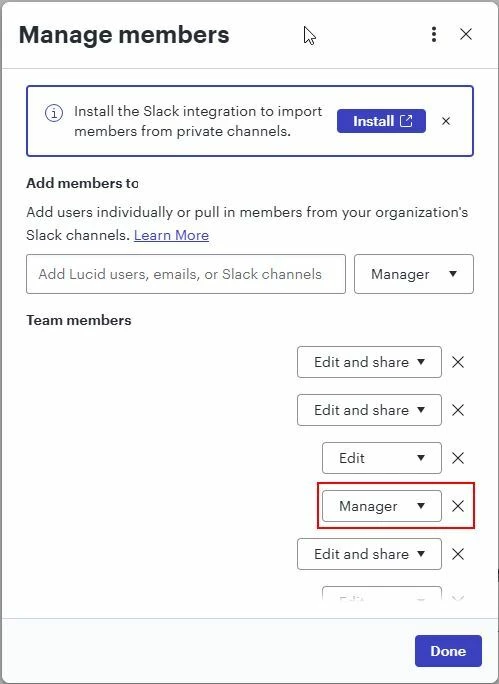
Unfortunately this manager is not able to manage the team members. He only has the button “View team members”.

What could be the problem?

Thanks for your help!

Comments

Forum|alt.badge.img+3
  • Lucid support team
  • January 12, 2026

Hi ​@Uwe Mensler,


Thank you for posting in the Lucid Community! As a first step, can this user try logging out, clearing cache and cookies, and then logging back in to Lucid? Please let me know if this issue persists after trying these steps.


Forum|alt.badge.img+1
  • Author
  • January 13, 2026

Hello ​@aishakhan ,

Unfortunately this didn’t help. Any other possibility? Are there any company settings which can overrule the team settings?

Thanks!


Forum|alt.badge.img+3
  • Lucid support team
  • January 13, 2026

Hi ​@Uwe Mensler,


Thanks for the reply! I don’t believe this issue is related to a company setting. To take a closer look at what’s going on, could you share a Technical Support PIN for the account who is experiencing this issue? This PIN is safe to post in this thread because it is only accessible by members of the Lucid support staff. You can find steps for generating a Support PIN in this Lucid Help Center article: Generate a Lucid Support PIN.


Forum|alt.badge.img+1
  • Author
  • January 14, 2026

Hello,

This is the support pin: iaEGryxqlyyshtnznbucOSXWhXh2yJj2cK118020829

But I cannot share the information about the effected user. This would be needed to be provided via a closed channel, not via the forum.

Thanks for your help. 

Regards,

Uwe