
Solved
Invite to a Lucidchart not working
Hi,
i got an invite to an lucid chart document. however it says that “the requested invitation is no longer active.”
I am on a free plan.
Hi,
i got an invite to an lucid chart document. however it says that “the requested invitation is no longer active.”
I am on a free plan.
Hi
My suggestion is to try creating a Shareable URL for this specific document.
In order to do this go to “Share” on the top right of your screen:
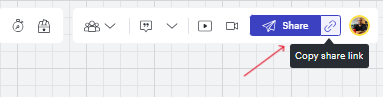
After this - enable the Share Link. It should appear like this:
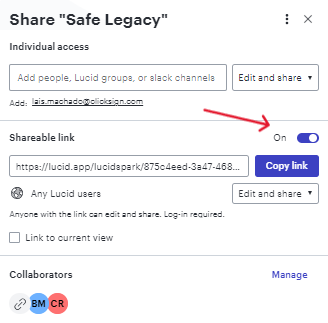
After this your team should be able to access the document and, as doing so, they're going to be asked to answer a quick registration form and they’ll classified as collaborator:
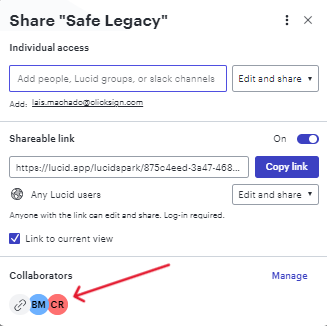
If you're concerned with security reasons in order to have a public Link, after they've joined, you can disable the URL and they’ would still have access.
If this is not the case - maybe check if you're using a trial or, even if the document was recently deleted.
Hope this helps.
Rafael
A Lucid or airfocus account is required to interact with the Community, and your participation is subject to the Supplemental Lucid Community Terms. You may not participate in the Community if you are under 18. You will be redirected to the Lucid or airfocus app to log in.
A Lucid or airfocus account is required to interact with the Community, and your participation is subject to the Supplemental Lucid Community Terms. You may not participate in the Community if you are under 18. You will be redirected to the Lucid or airfocus app to log in.
Enter your E-mail address. We'll send you an e-mail with instructions to reset your password.
 Your privacy choices


