
Answer

Document automatically opens in Lucidspark

  • November 21, 2024
  • 2 replies
  • 47 views

DavidJ
Forum|alt.badge.img+1

Hello,

Whenever I open a document it opens immediately in Lucidspark. I have to manually have it then open in Lucidchart. How can I set Lucidchart as my default start location? I have looked but cannot find any relevant settings. Thanks!

Dave
Best answer by Shantel Gillette

@DavidJ,

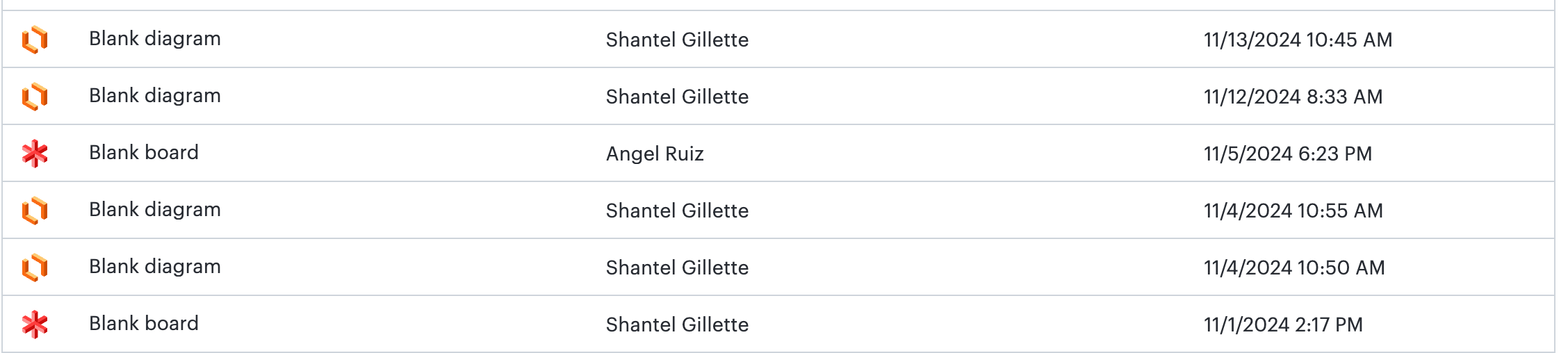
Can you tell me if the documents you are opening show the Lucidspark or Lucidchart icon next to them before you click to open them? I specifically want to know if the document shows a Lucidchart icon (the orange one), but still opens in Lucidspark? They should open in the product they were originally created in. 


Comments

Shantel Gillette
Forum|alt.badge.img+5
  • Lucid product team
  • Answer
  • November 21, 2024

@DavidJ,

Can you tell me if the documents you are opening show the Lucidspark or Lucidchart icon next to them before you click to open them? I specifically want to know if the document shows a Lucidchart icon (the orange one), but still opens in Lucidspark? They should open in the product they were originally created in. 


DavidJ
Forum|alt.badge.img+1
  • Author
  • November 21, 2024

Thank you for responding to this newbie! I just noticed the difference of icons. Once I noticed that I understood why documents opened where they did.