

airfocus release notes | April 2026

airfocus, now part of Lucid, is a product management platform designed to unite teams to build great products with confidence. It serves as a single source of truth for product work, offering strategic roadmapping and advanced prioritization tools. The platform centralizes customer feedback for actionable insights, links OKRs to execution, and enables capacity planning. Its modular design supports customizable workflows, empowering product teams to build more effectively, no matter their approach.
Subscribe here to stay up to date with airfocus updates and releases! And if you’d like to see (and influence) the airfocus roadmap, check out the airfocus Portal.
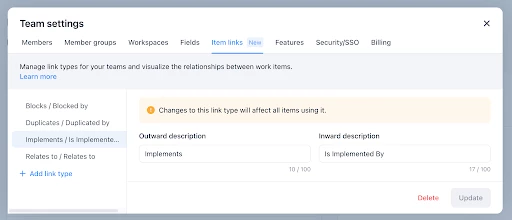
Custom item links types
Define your own link types in team settings to map relationships between items the way your team thinks about them—beyond the defaults like Blocks, Duplicates, and Relates to.
This is especially helpful for users who have custom link types in their Jira instance—they can now create those same link types on the airfocus side rather than mapping to the default three link types. To learn more about creating custom item links, visit our Help Center article.
Jira Fix Version and Milestone Syncing
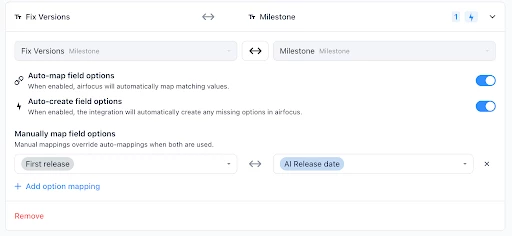
Map the airfocus Milestone field to Jira Fix Versions. We’ve introduced two new mapping options to support different workflows:
- Fix Version (most recent) ➡ Milestone (single select): A one-way mapping that ensures you don’t overwrite external data with incomplete information
- Fix Version ↔ Milestone (multi-select): A full two-way mapping for bidirectional synchronization
This update supports auto-mapping, manual mapping, and the ability to auto-create field options in airfocus (auto-create is not supported in Jira). To learn more about these updates to the Jira integration, visit our Help Center article.
Edit Lucid documents directly in airfocus
Edit Lucid documents directly in airfocus. Simply click the Select from Lucid option when embedding a Lucid view, and you will be able to select an existing document or create a new one. When prompted, give the document edit permissions, add it as a view, and you will be taken to an embedded Lucid editor experience. To learn more about embedding Lucid documents in airfocus, visit our Help Center article.
 Your privacy choices


