



Question
Streamlining Student IEP Goals with Lucid
I recently watched a training video by
- Step 1: Set up a Dynamic Table
Go to the container menu and select a dynamic table. You can start from scratch with a blank table or use a preconfigured template to get a head start. - Step 2: Pivot Your Rows and Columns
Customize the table to fit your classroom layout. Set up your rows to show your student names and your columns to show the current status of their goals. This lets you see exactly what is on each student's plate and where they stand. - Step 3: Break Down Large Goals
You don't have to tackle massive IEP goals all at once. Use the "parent-child shape" functionality to take a major objective and break it down into smaller, bite-sized sub-skills underneath it. - Step 4: Enable Visual Progress Tracking
Open the planning menu on your dynamic table and turn on the progress bar feature. As a student masters each individual sub-skill, their overall progress bar will automatically fill up, giving you an instant visual indicator of their success. - Step 5: Use Capacity Planning
Finally, toggle on the capacity planning feature from the planning menu. You can set a target "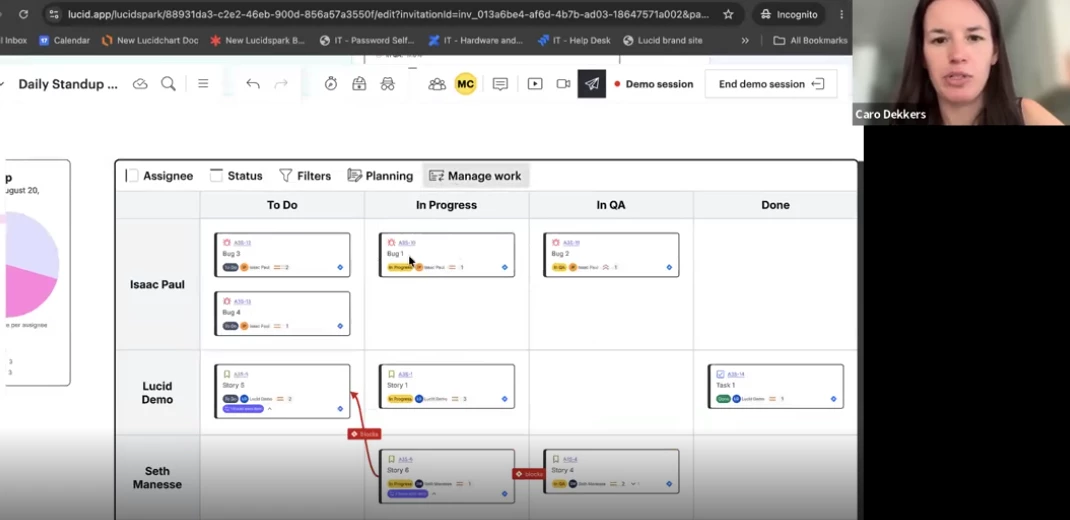
Dynamic Tables (not demonstrated with IEPs)
If you are looking for a highly visual, collaborative way to stay on top of special education data, I highly recommend checking this out!
 Your privacy choices


