


Streamline IEP Collaboration Using Visual Workflows
Writing IEPs means relying on a whole team of adults, including general education teachers, speech therapists, counselors, and occupational therapists. For a case manager, the hardest part is rarely writing your own sections. The hardest part is constantly chasing down other adults for their test data, goal proposals, and updates before the deadline.
Using Lucidspark creates a shared visual board where task ownership is clear. Instead of sending endless reminder emails, you can build a board that makes missing work visible to the whole team.
1. Set Up Columns to Track Unfinished Work
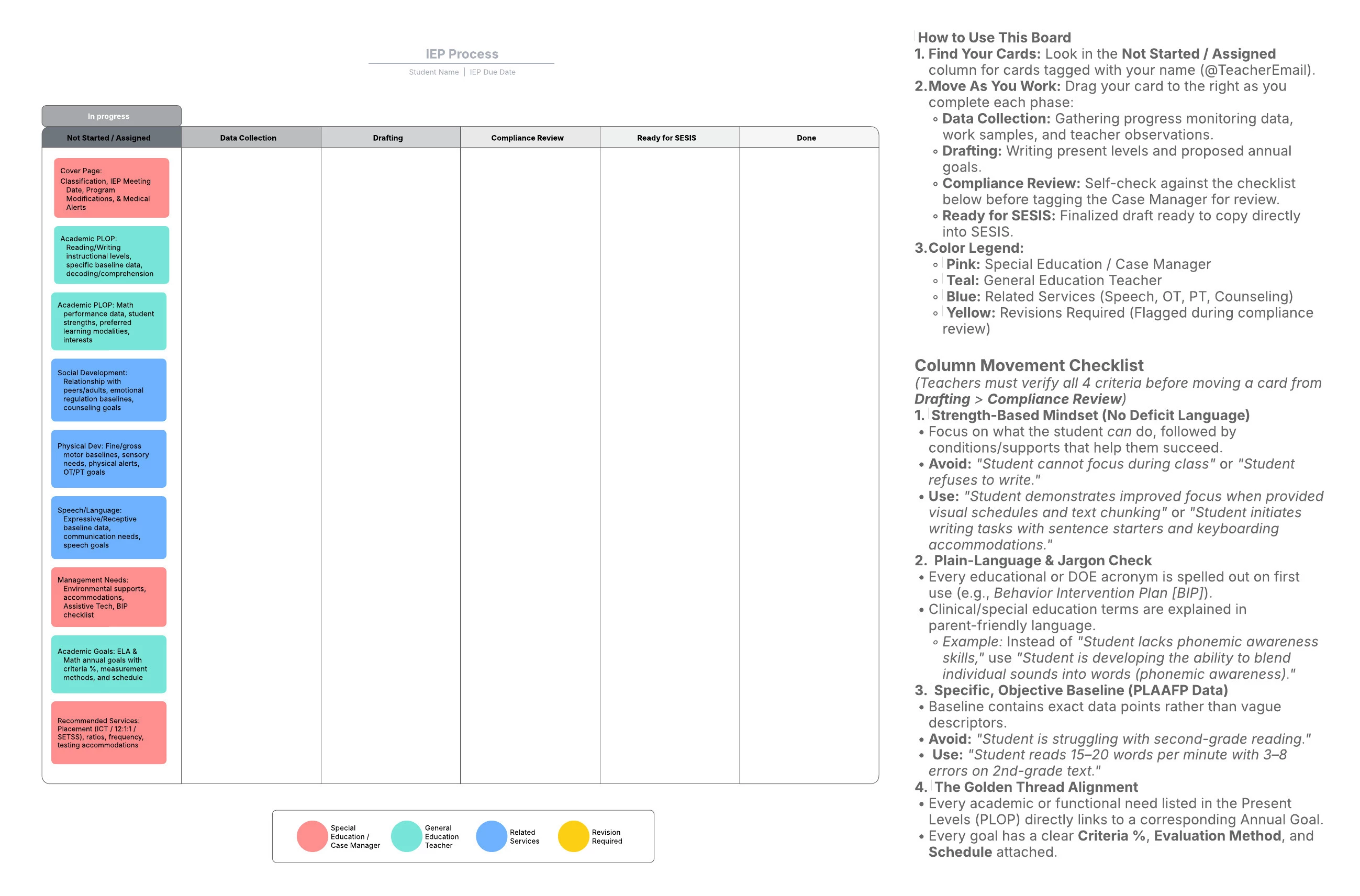
Create a 5-column board in Lucidspark (or copy this template). This visual setup makes it obvious where every section is stuck in the pipeline:
-
Column 1: Assigned / Waiting on Team — The case manager drops in cards for each section and tags the assigned teacher or therapist.
-
Column 2: Data Gathering — Teachers gather test scores, work samples, and notes from families.
-
Column 3: Active Drafting — Providers write their performance baselines and proposed goals.
-
Column 4: Needs Review — The case manager checks the submitted text before approving it.
-
Column 5: Ready for SESIS — Approved sections are marked done and ready to paste into the official portal.
2. Tag Providers Directly to Make Accountability Clear
When tasks are assigned vaguely, people assume someone else is doing the work. Assign every card to a specific person using color coding and tags in Lucidspark:
-
Pink (Special Education Case Manager): Cover Page, Student Profile, Management Supports, and Recommended Services.
-
Teal (General Education Teacher): Reading, writing, and math performance levels, plus learning styles.
-
Blue (Related Service Providers): Speech therapy, counseling, OT, and PT baselines and goals.
-
Yellow Tag (Needs Changes): Flagged during review when a provider turns in incomplete or vague work.
Adding a direct tag like @TeacherName on a card notifies that person directly, making it clear exactly who owns each section.
3. Stack Sections in Order to Show Dependencies
When one provider is late with their data, it blocks other parts of the document. Stack cards in Column 1 in the exact order of the IEP to show how delays impact the rest of the team:
-
Cover Page and Profile: Basic student details and health alerts.
-
Academic Performance Baselines: Grade levels and clear test scores.
-
Social and Physical Needs: Behavior notes, movement needs, and sensory supports.
-
Speech and Language: Communication scores and needs.
-
Classroom Supports: Helpful tools, accommodations, and assistive technology.
-
Measurable Goals: Yearly targets that match identified needs.
-
Final Service Recommendations: Class size, therapy times, and test accommodations.
4. Set Clear Rules So You Do Not Have to Send Work Back
To avoid chasing team members down a second time to rewrite, place a locked quality checklist on the side of your board. Require providers to check these standards before moving their cards into review:
Focus on Strengths First
-
Frame challenges around what the student can do when given proper support.
-
Avoid: "Student cannot focus during group work."
-
Use: "Student stays on task when given picture schedules, short directions, and quick breaks."
Use Simple, Clear Language
-
Ensure parents can understand the text. Require teachers to explain jargon and spell out acronyms, like writing out Behavior Intervention Plan for BIP.
-
Avoid: "Student lacks phonemic awareness."
-
Use: "Student is learning to blend individual letter sounds into full words."
Use Real Numbers and Data
-
Require specific testing data instead of vague descriptions.
-
Avoid: "Student reads below grade level."
-
Use: "Student reads 15 to 20 words per minute with 3 to 8 errors on second-grade text."
Using a visual task board takes the stress out of managing an IEP team. Instead of spending weeks nagging colleagues for missing parts, you can let clear task assignment and visual progress tracking keep everyone on schedule.
 Your privacy choices


