
When I share a whiteboard with my class using Logged In Users can edit, I need to restrict the students from being able to change their name. Some boys are up to shenanigans --- restricting their ability to change their name will discourage the behavior or at least expose the culprit.
Solved
Lucid whiteboard restricts collaborators from changing name
 +2
+2Best answer by Kathy R
You can ‘lock’ the boxes where the names are….but they can ‘unlock’ them too, just like you can, since they have edit privileges (which you want them to have so they can share the whiteboard. So, I believe the official answer is ‘no’.
HOWEVER, you can track changes to the document and see who is changing what. Also, if you have ‘show authors’ on, when they add sticky notes, or make comments, their name is directly attached to that note/change on the board. The rule in my class then becomes, “You mess up the board or don’t use it appropriately, you will complete this activity on a piece of paper rather than the computer like your peers.”
It takes some monitoring for a little bit, but once they see that they can’t participate in the same way, and the alternative isn’t as much fun, they seem to change their actions.
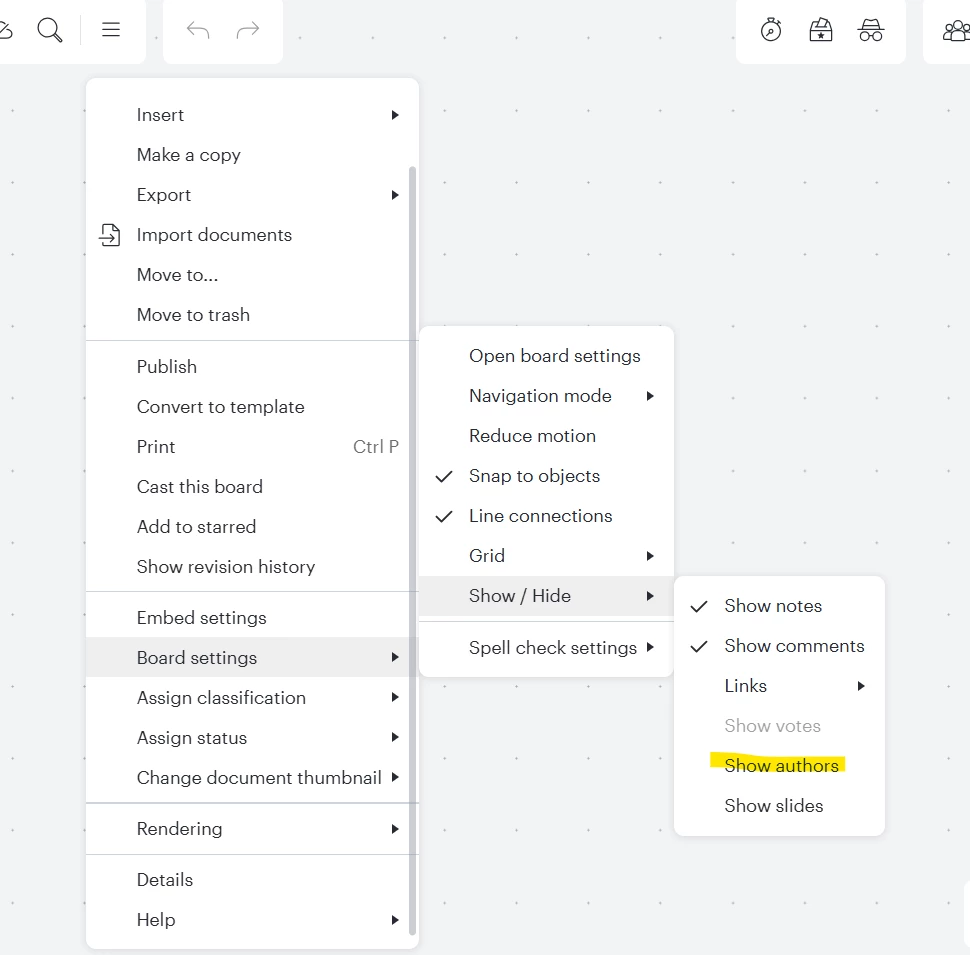
Does that help a little??




Create an account in the community
A Lucid or airfocus account is required to interact with the Community, and your participation is subject to the Supplemental Lucid Community Terms. You may not participate in the Community if you are under 18. You will be redirected to the Lucid or airfocus app to log in.
Log in to the community
A Lucid or airfocus account is required to interact with the Community, and your participation is subject to the Supplemental Lucid Community Terms. You may not participate in the Community if you are under 18. You will be redirected to the Lucid or airfocus app to log in.
Log in with Lucid Log in with airfocus
or
Enter your E-mail address. We'll send you an e-mail with instructions to reset your password.
 Your privacy choices


