

My team is very excited about the new Lucid for Education with Canvas integration. We were wondering what will happen to the Lucid documents we embed in our Canvas courses if the person who created the Lucidspark or Lucidchart leaves our company. Would they need to change the document’s ownership like you do with regular Lucid documents? or does the Canvas integration change that somehow?
Solved
Lucid for Education Document Ownership
Best answer by Liz G
Hi Katie,
Thank you for posting in the Lucid Community! The Canvas integration will not change the owner of the document if they are deleted. This will still need to be done within Lucid, either via the sharing menu or when a user is deleted from an account. For more information on transferring ownership of documents, you can check out this Help Center article
However, you can allow embedded documents to persist in Canvas once a the creator of the document has been deleted or no longer has access to the document. To do this, an Account admin will need to access the admin panel and select the options shown below.
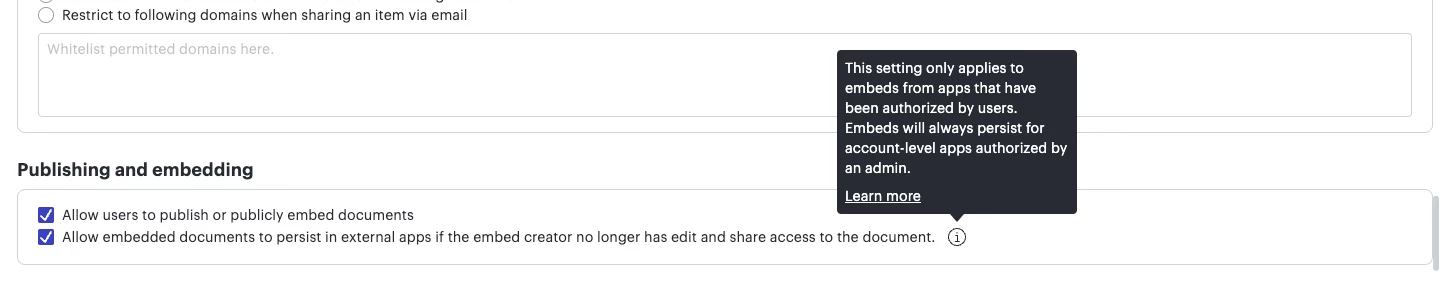
Depending on your account’s admin panel experience, this option will either be accessible via the Security settings or via Organizational groups.
Please let us know if you have any additional questions. Hope this helps!


Create an account in the community
A Lucid or airfocus account is required to interact with the Community, and your participation is subject to the Supplemental Lucid Community Terms. You may not participate in the Community if you are under 18. You will be redirected to the Lucid or airfocus app to log in.
Log in to the community
A Lucid or airfocus account is required to interact with the Community, and your participation is subject to the Supplemental Lucid Community Terms. You may not participate in the Community if you are under 18. You will be redirected to the Lucid or airfocus app to log in.
Log in with Lucid Log in with airfocus
or
Enter your E-mail address. We'll send you an e-mail with instructions to reset your password.
 Your privacy choices


