

Tips for Grading Collaborative Discussions in Canvas
Instructor “Tell All” | Quickly grade authentic participation
As instructors, we want all of our students to be intrinsically motivated and try their very best because they personally want to get the most out of their education, but the reality is that many students need a little extra push and often try harder when they are held accountable for their work. Instructors use participation grades to ensure deeper student engagement.
Problem: Instructors are excited to incorporate more authentic student discussions in Canvas using Lucid, but they are unsure of how to quickly grade student participation.
Solution: I have met with a bunch of wonderful instructors to learn how they get the most out of their students by holding them accountable for their active participation in Lucid discussion boards without spending hours trying to figure out who did what on the board.
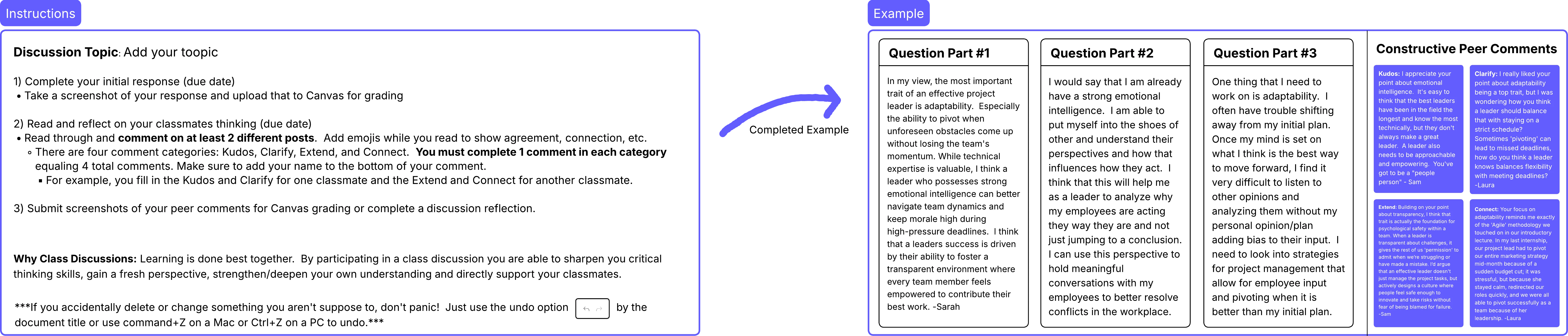
Step #1: Set students up for success | Template
- Provide clear instructions
- Provide a rubric
- Show a completed example
Step #2: Grade Active Participation
Option 1: Set the Canvas discussion up as an assignment with online “file upload” as the submission type. Students take screenshots or download each of their collaborations to submit for quick, easy grading by the instructor. → Explore Example
Option 2: Set the Canvas discussion up as an assignment with online “text entry” as the submission type. Students submit a short paragraph reflecting on their educational take-aways from the discussion. → Explore Example
Option 3: Structure the discussion board for easy grading. Assign students to a specific section of the board for their initial response and peer comments. Pair this with either grading options above for even faster grading. → Explore Example
Option 4: Require students to sign the bottom of all of their collaborations and then use command/Ctrl+F to search for student names and quickly look through all of their contributions to the board. → Explore More Tips
Help the community, comment on this post and share your tips and tricks for quickly grading student participation for collaborative activities in Lucid.
 Your privacy choices


