
Answer

Share a Lucid board with a colleague who does not have a license

  • April 29, 2025
  • 5 replies
  • 87 views

Forum|alt.badge.img+3

Hi, I have a Lucid Suite for Education account and I am trying to collaborate with a colleague who does not have a license. I opened a board and clicked on Share and gave her edit and share rights. She can go into the board and make comments but cannot do anything else. Can you please help me figure out what is the solution to the problem? Thank you, Elena

 

Best answer by Vanessa C101

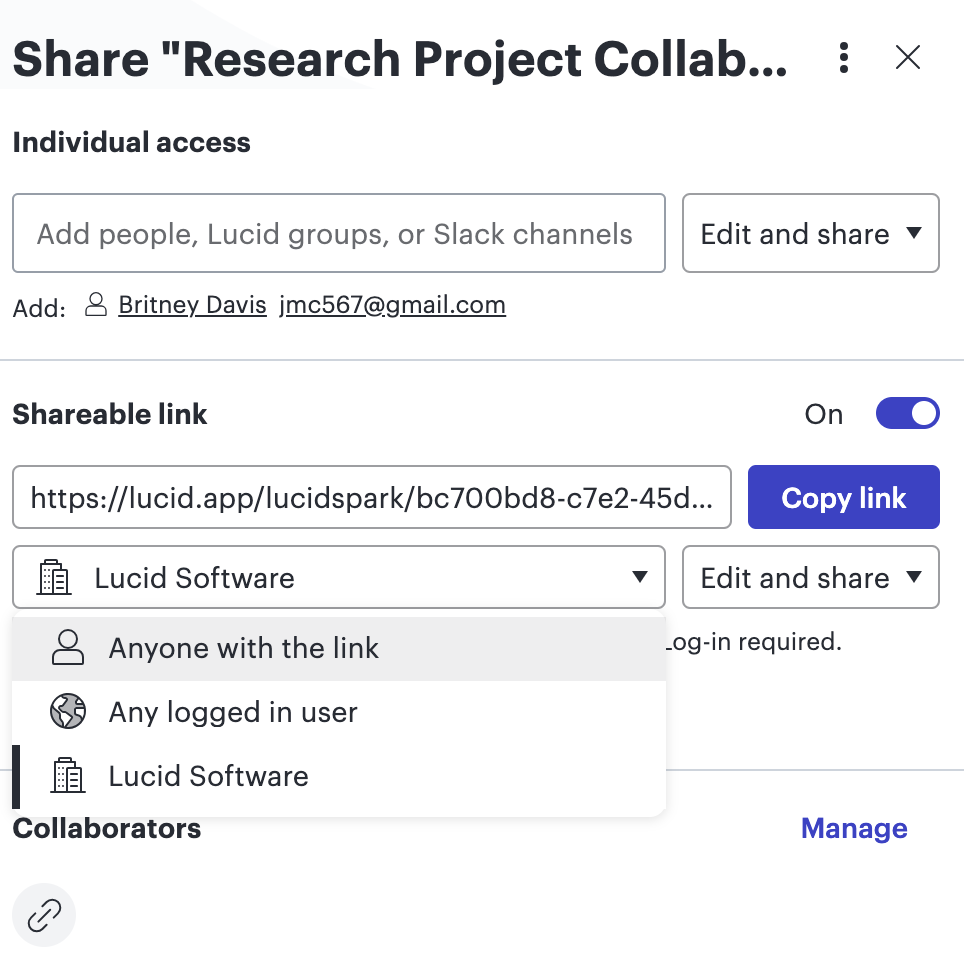
@Elzaro You can share Lucidspark bords with others and they do not need a license, but you need to use the “anyone with the link” selection. If you are trying to collaborate with Lucidchart, the other collaborators will need licenses. Lucidchart does not have this sharing option.


Comments

Vanessa C101
Forum|alt.badge.img+14
  • Lucidite
  • Answer
  • April 29, 2025

@Elzaro You can share Lucidspark bords with others and they do not need a license, but you need to use the “anyone with the link” selection. If you are trying to collaborate with Lucidchart, the other collaborators will need licenses. Lucidchart does not have this sharing option.


Forum|alt.badge.img+3
  • Author
  • April 30, 2025

Thank you for the response. I did select anyone with the link and I shared the link with the person and they could only make comments. 


Vanessa C101
Forum|alt.badge.img+14
  • Lucidite
  • April 30, 2025

@Elzaro Hey, I might have to see this in action then.  You can add a meeting to my calendar here.


Forum|alt.badge.img+3
  • Author
  • May 1, 2025

Thanks, I just scheduled time for tomorrow.


Forum|alt.badge.img+3
  • Author
  • May 2, 2025

I didn’t have a link to join or a number to call into.
