Idea

Set a default color for freehand drawing pen

Related products:Lucidspark
  • June 26, 2025
  • 1 reply
  • 19 views

Forum|alt.badge.img

The free hand pen always defaults to yellow. I’d like to be able to set a default color (like black), or at least have it remember the last-used setting.

June 30, 2025

Hi ​@3Elisa3, thanks for this idea!

To clarify, the default freehand drawing color matches the color of your profile/profile picture in Lucid. If your profile color is set to yellow, your free hand drawing pen will always default to yellow. If you would like to set a different default color, one suggestion is to select your profile in the top right of your Lucidspark document, select ‘My color’, and then set the color of your profile to match the color you’d like your freehand drawing pen to default to. 


I certainly understand how choosing a different default color might be beneficial! Thanks again for this idea!

We encourage anyone else who’s interested in this to upvote this post and share any additional details about your use case or what you’d like to see in this experience. For more information about how we manage feedback in this community, please take a look at this post:


Comments

Ambar D
Forum|alt.badge.img+10
  • Lucid community team
  • June 30, 2025

Hi ​@3Elisa3, thanks for this idea!

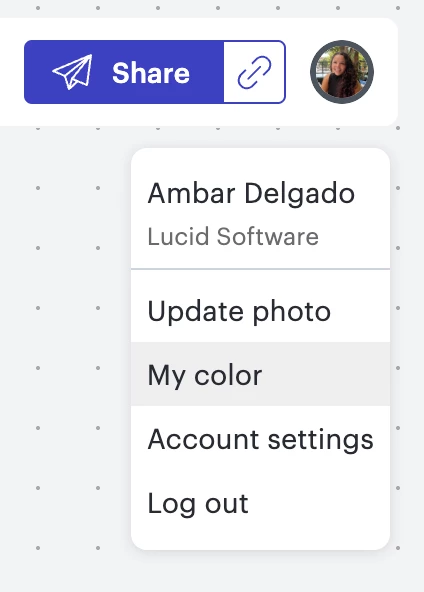
To clarify, the default freehand drawing color matches the color of your profile/profile picture in Lucid. If your profile color is set to yellow, your free hand drawing pen will always default to yellow. If you would like to set a different default color, one suggestion is to select your profile in the top right of your Lucidspark document, select ‘My color’, and then set the color of your profile to match the color you’d like your freehand drawing pen to default to. 


I certainly understand how choosing a different default color might be beneficial! Thanks again for this idea!

We encourage anyone else who’s interested in this to upvote this post and share any additional details about your use case or what you’d like to see in this experience. For more information about how we manage feedback in this community, please take a look at this post: