Idea

Transpose a diagram

Related products:Lucidchart
  • August 15, 2025
  • 3 replies
  • 40 views

Forum|alt.badge.img+1

I’m new to using LucidChart but so far I really like the fact that the elements have suggested syntax on what information to fill the shapes with.

I’ve been catching myself organizing a group of elements neatly and tidy in e.g a vertical direction. Then when I try to connect different groups to a starting element, I have problem stacking all vertical pieces, but it would’ve fit I’ve I ordered a group horizontally instead.

Is there currently a way to transpose a group of elements, just like you would with a matrix, i.e. make a horizontally organized group of elements into a vertically stacked group and vice versa?

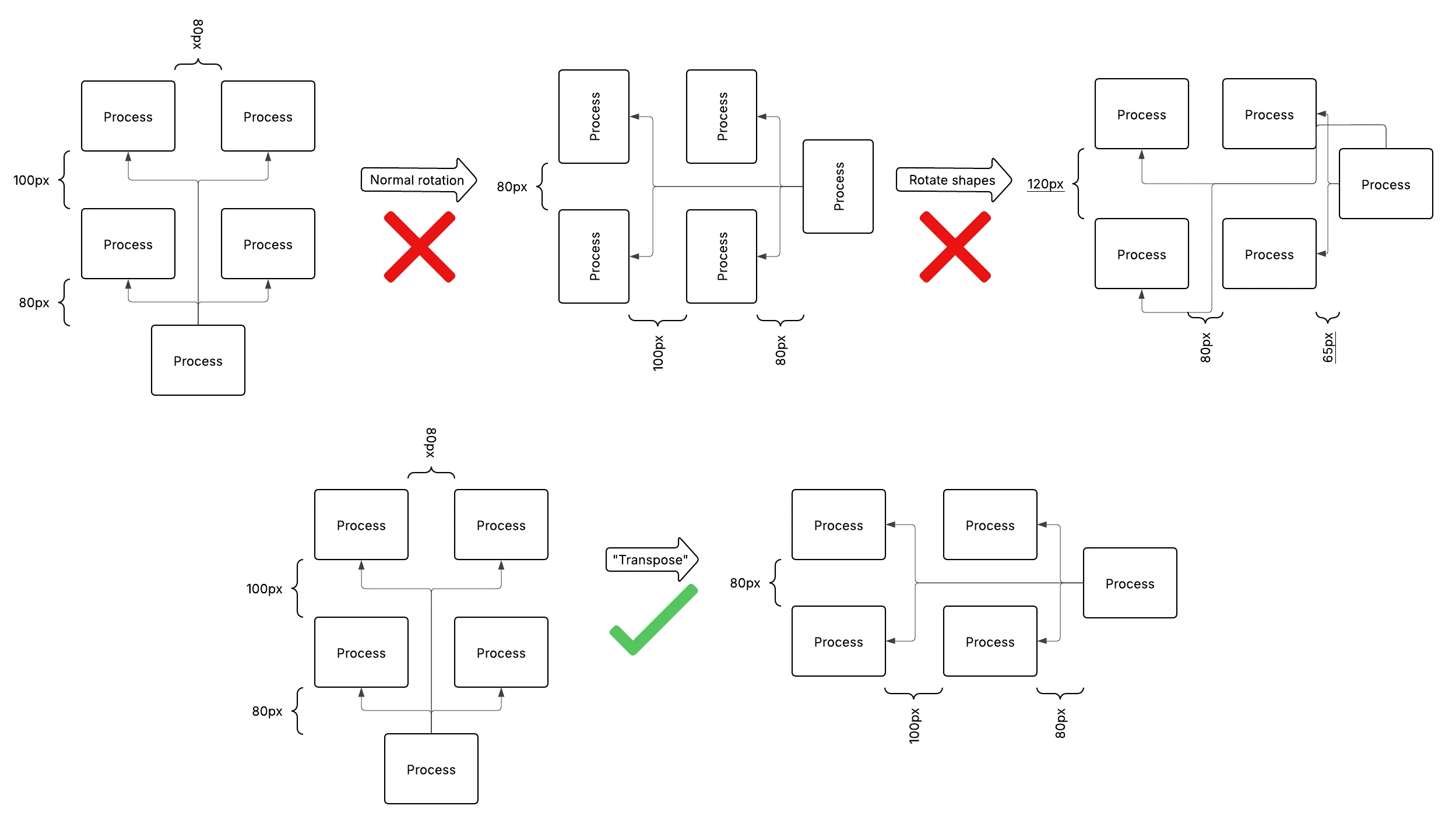
If it doesn’t exist, my idea is to add this feature, perhaps along with the ability to also reverse the order of the group. The elements are essentially just translated, not rotated, and the arrows are connected in the shortest path between the elements.

I’m also open to suggestions on how to adapt my workflow so I don’t run into this issue.

August 18, 2025

Thank you ​@axer0007, thanks for providing this visual, I can certainly understand why this would be a useful tool! 

Your feedback is incredibly important to us, so thank you for taking the time to leave these details for review. Our product team is regularly reviewing the feedback within this space of the community as they continue to research product enhancements and new features. 

We encourage anyone else who’s interested in this to upvote this post and share any additional details about your use case or what you’d like to see in this experience. For more information about how we manage feedback in this community, please take a look at this post:


Comments

Ambar D
Forum|alt.badge.img+10
  • Lucid community team
  • August 18, 2025

Hi ​@axer0007, thanks for posting in the Lucid Community!

Just to clarify - For a group of shapes originally arranged in a horizontal line, are you hoping to be able to automatically move them to be arranged in a vertical line, and vice versa?

Shapes organized into a horizontal line to start with

Switching from the above to the below, is that correct?

Shapes then organized into a horizontal line

Sorry for any confusion if I’m misunderstanding! I want to ensure we properly document your feedback.


Forum|alt.badge.img+1
  • Author
  • August 18, 2025

Hi Ambar. Thanks for looking at my suggestion! 

My proposed feature definitely can be used for that purpose. However, maintaining the spaces is also important for more complex charts. I’ve attached an image. Note that in the first process, the spacing and arrows get messed up. In the proposed “transpose” action the spacing is also transposed. Something along these lines is what I’m thinking. 


Ambar D
Forum|alt.badge.img+10
  • Lucid community team
  • August 18, 2025

Thank you ​@axer0007, thanks for providing this visual, I can certainly understand why this would be a useful tool! 

Your feedback is incredibly important to us, so thank you for taking the time to leave these details for review. Our product team is regularly reviewing the feedback within this space of the community as they continue to research product enhancements and new features. 

We encourage anyone else who’s interested in this to upvote this post and share any additional details about your use case or what you’d like to see in this experience. For more information about how we manage feedback in this community, please take a look at this post: