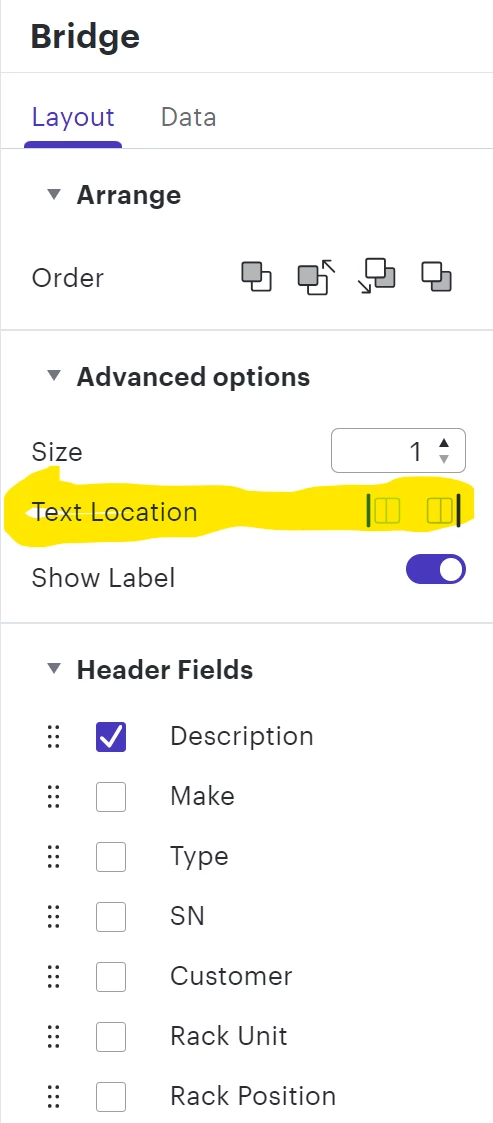
It is very helpful to have labels from the data fields showing up in the chart. Right now we have component’s labels that includes either description or hostname showing on the left side of the component, and all the blanks (empty spaces) showing elevation (rack position) on the right. It mostly works great, except when the whole rack is full with equipment. In that case we see all our equipment hostname labels on the left and no rack position. If we add second field as additional label from the datasheet the whole chart is not easily readable as the line wrapping makes it difficult to read. I would suggest to to enable fields label position per field. So, in essence I would like to enable and see my equipment hostname data field show up on the left side of the given component, and also have my rack elevation field (second field) to show on the right side of the same component. I hop[e it makes all sense. Right now under layout there is a text location left/right option which applies to all the header fields. The only option in the individual header field is to show/hide labels. Please add text location to the individual fields, so it can override the global top level setting if needed.