Idea

Change shape does not show all shapes as options

  • August 11, 2021
  • 2 replies
  • 18 views

Michael F103

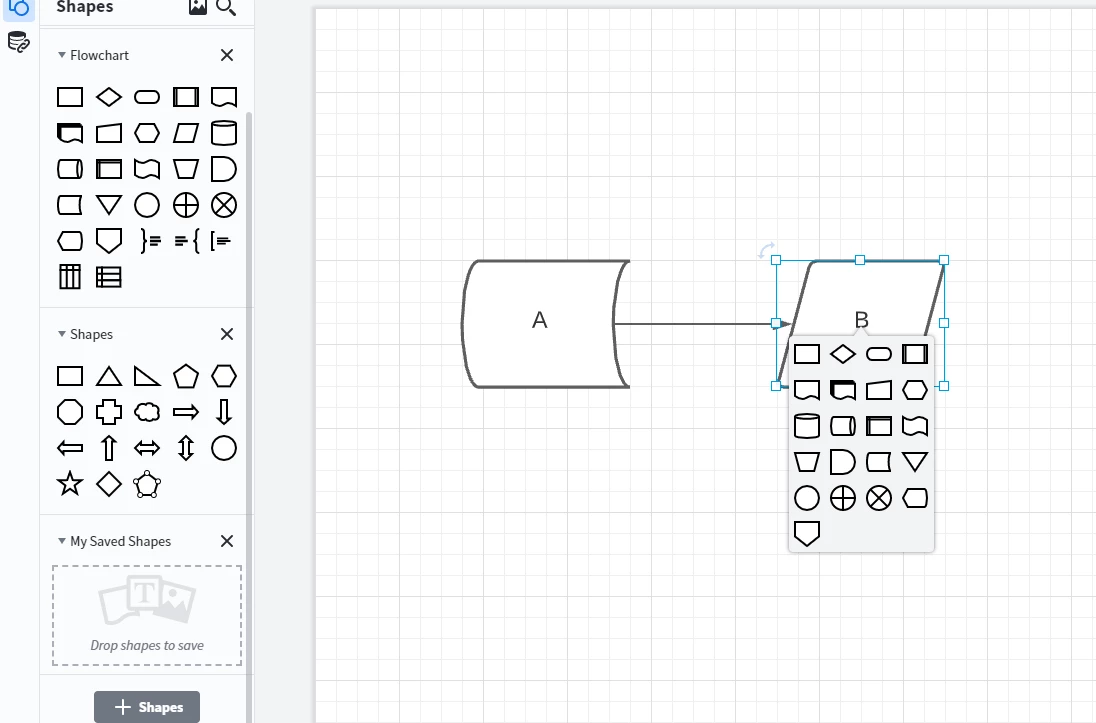
When I right click on a shape and click "Change Shape" not all shapes are shown as options. In particular the shapes for A and B in the below chart are not available.


How can I change objects to these other shapes which are not displayed in the "Change Shapes" menu?
 

Comments

Abigail M
Forum|alt.badge.img+7
  • Lucid support team
  • August 17, 2021

Hi Michael

Thanks for posting in the community! Some shape libraries like the flowchart shapes give you the option to right-click > Change Shape. Unfortunately this isn't possible for all shapes from any shape library. The options within the Change Shape are determined by the library from which they originate so these cannot be manipulated. 

The reason you cannot see the B shape in the screenshot you provided is because our Change Shape function does not allow you to switch to the current shape. You can see the A shape in the 4th row 3rd column. When you select the A shape you should see the B shape in the 3rd row 1st column.

I hope this answers your questions about our Change Shape feature. If you have any more concerns let me know! If you would like to request a change to this function please feel free to submit a feature request. Ideas submitted to this form are passed on to the product development team for their consideration.


Micah
Forum|alt.badge.img+20
  • Lucid community team
  • January 3, 2024
Idea merged into:

All the votes from this idea have been transferred.

