Answer

Students initiating a Lucidchart in Canvas

  • October 6, 2025
  • 2 replies
  • 31 views

Kaptainl
Forum|alt.badge.img+2

Folks, I gave a class of undergraduates an assignment to create a Lucid Chart in Canvas. I used Snagit to make a picture file of the Canvas Tool Bar with the Lucid logo. I even placed a big red arrow pointing to the Lucid “L” logo. Come to find out, the student couldn’t create a Page in Canvas. They were frustrated, and I was surprised. What am I missing? Thanks! Larry

Best answer by Vanessa C101

@Kaptainl are your students working on independent projects or group activities.  If they are working on an independent activity, you can assign Lucid through assignments and select “blank document” this will just give them a blank Lucidchart document to work from on the Canvas assignment page.  If it’s a group assignment that you created using the group functionality in Canvas, then students can add a page to their groups homepage and embed a Lucid document there.  Lastly, students should be able to click on the Lucid (whiteboard) option from the navigation to go to their own Lucid account and create a new document.


If any of this looks different, then your institution may have not have the integration enabled correctly.  Email me at vcicero@lucidchart.com and we can hop on a call and take a look at it together.

Comments

Forum|alt.badge.img+1

The Canvas LMS does not allow students to create pages. That feature is exclusive to the Teacher and Designer role (sometimes the TA role, depending on the institution).

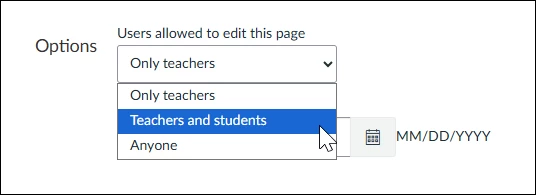
Instructors have the ability to adjust the settings of Canvas pages to allow for student editing (see screenshot below). 

Depending on the number of students, you could create a page for each student with the settings that allow them to edit the page, and they could add their LucidChart to their assigned page. 

Alternatively, you could consider modifying the assignment to be a discussion board and each student could post their LucidChart as a discussion post so the other students are able to view the boards. Lucid is available in the rich content editor of discussion posts, same as on a page.

Hope this helps!


Vanessa C101
Forum|alt.badge.img+14
  • Lucidite
  • Answer
  • October 6, 2025

@Kaptainl are your students working on independent projects or group activities.  If they are working on an independent activity, you can assign Lucid through assignments and select “blank document” this will just give them a blank Lucidchart document to work from on the Canvas assignment page.  If it’s a group assignment that you created using the group functionality in Canvas, then students can add a page to their groups homepage and embed a Lucid document there.  Lastly, students should be able to click on the Lucid (whiteboard) option from the navigation to go to their own Lucid account and create a new document.


If any of this looks different, then your institution may have not have the integration enabled correctly.  Email me at vcicero@lucidchart.com and we can hop on a call and take a look at it together.